An illustration of the topic, rather than an actual product screenshot or exact architecture diagram.
I expected coupon payments to need a new type and detail view. Changing the total expected amount also had to clear an applied coupon, though, and the information shown before saving differed from the saved record. Adding a COUPON method could not distinguish those cases by itself.
The service records cancellations as separate transactions rather than modifying the original payment. Coupons added another relationship: an on-site payment and its coupon usage had to appear within the same transaction. I needed to consider status, saved state, selection, and discount amount as well as method.
I first considered a discriminated union for every case. The server, however, returned one DTO with enums and optional fields, and unknown values needed a fallback. Instead of asserting the response into a different shape, I gathered the code deciding which rows to show and which detail component to render. The examples keep only relevant methods and statuses; diagrams retain the actual names.
Keep discount previews out of the response DTO
The server returns a payment record shaped like this.
interface PaymentHistoryResponse {
  id?: number | null;
  method: 'NORMAL' | 'CANCEL' | 'COUPON';
  status: 'PROCESSING' | 'WAITING' | 'COMPLETED';
  paymentAmount: number;
  paymentDate?: string | null;
  memberCouponId?: number | null;
  couponName?: string | null;
}
While choosing a coupon, the form needs its discount to preview the final amount. That value is not part of the server's payment record, so I kept it in the form model.
interface PaymentHistoryFormValue extends PaymentHistoryResponse {
  couponDiscountAmount?: number | null;
}
I initially declared couponDiscountAmount on the response DTO, then moved it to the form type. This separates fields sent by the server from a value added for a screen calculation. Submission also selects fields explicitly instead of spreading the whole form.
// 확정 전 예약 상세의 결제 내역은 화면이 만든 쿠폰 행 하나뿐이다.
const couponPayment = payments.find(({ method }) => method === 'COUPON');
if (!couponPayment) return;

confirmReservation({
  reservationId,
  paymentAmount: couponPayment.paymentAmount,
  paymentDate: couponPayment.paymentDate,
  memberCouponId: couponPayment.memberCouponId,
  // 견적 금액·내원일·메모는 폼의 다른 칸에서 채운다.
});
Coupon reservations are confirmed from reservation details in hospital admin. Before confirmation, this form contains only the coupon row created by the screen, so its payment array is narrowed to a one-element tuple. Selecting the amount, date, and memberCouponId leaves the discount preview and coupon name out of the request.
I did not introduce a separate form-to-request mapper. There were few editing-only fields, and the request builder already selected the values to send, so it could exclude them there.
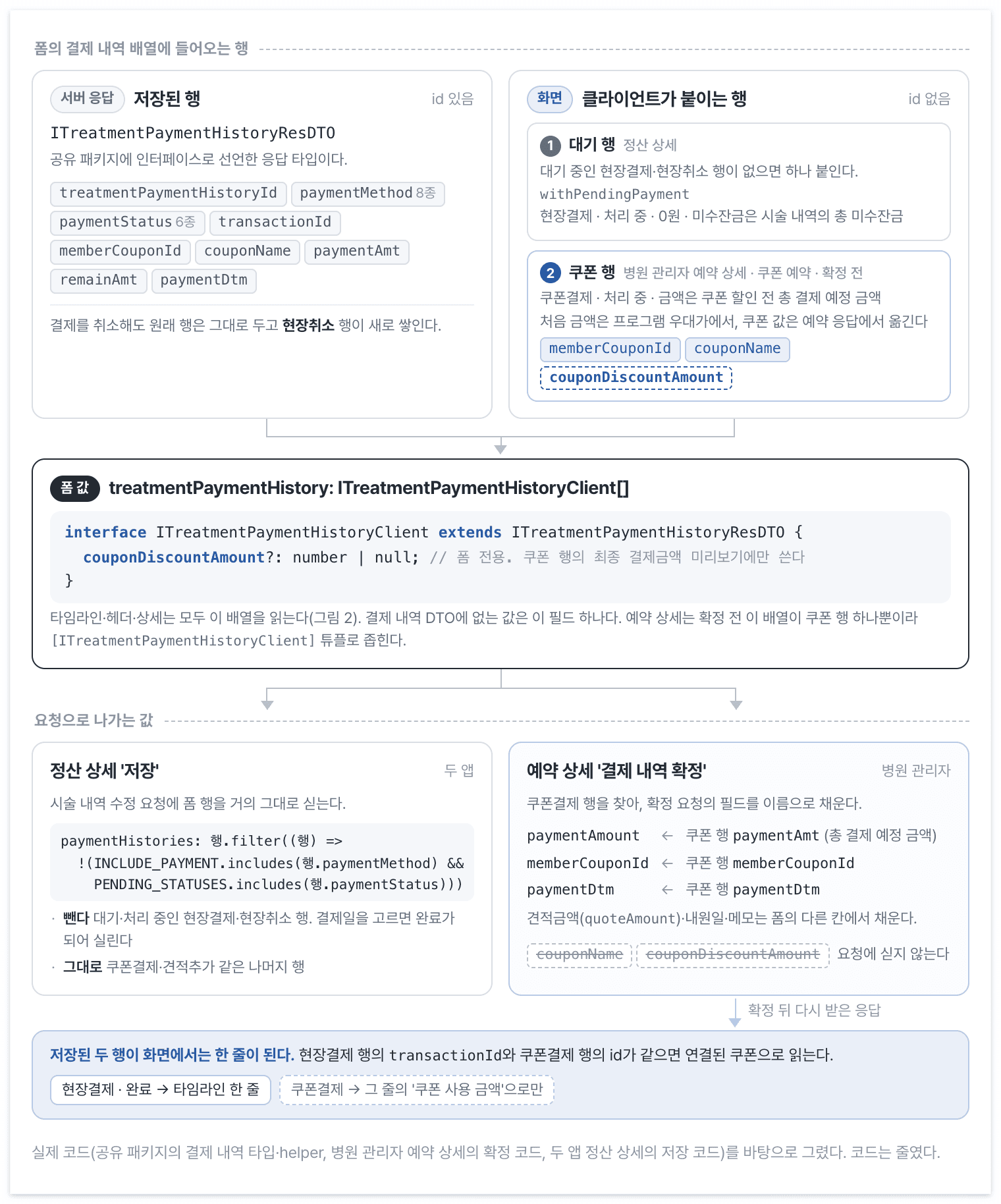
The form array contains server records and pending or coupon rows created by the screen. Only the coupon discount amount is absent from the payment DTO; confirmation selects the required fields from the coupon row.
Saved coupon payments do not receive separate timeline rows. The on-site payment finds the linked coupon and shows its usage amount within the same transaction.
A complete status can still need editable inputs
I wrote out the cases before choosing detail components.
| Saved | Method | Status | View |
|---|---|---|---|
| No | Coupon | Processing | Coupon selection and expected amount |
| No | Other | Processing | Standard payment input |
| Yes | On-site | Complete | Completed details and linked coupon |
| Yes | Cancellation | Complete | Cancellation details |
| Yes | Other | Pending/processing | Standard pending details |
Selecting a payment date changes status to complete before the row is saved. Choosing completed details by status alone would remove inputs that are still editable. Details therefore check id first. The header and dot color follow status immediately, so the row can briefly show both a payment-complete tag and input fields.
Visibility and color helpers already existed from moving hospital admin and Back-Office UI into a shared package. I added coupon visibility there and changed the order used to select detail components.
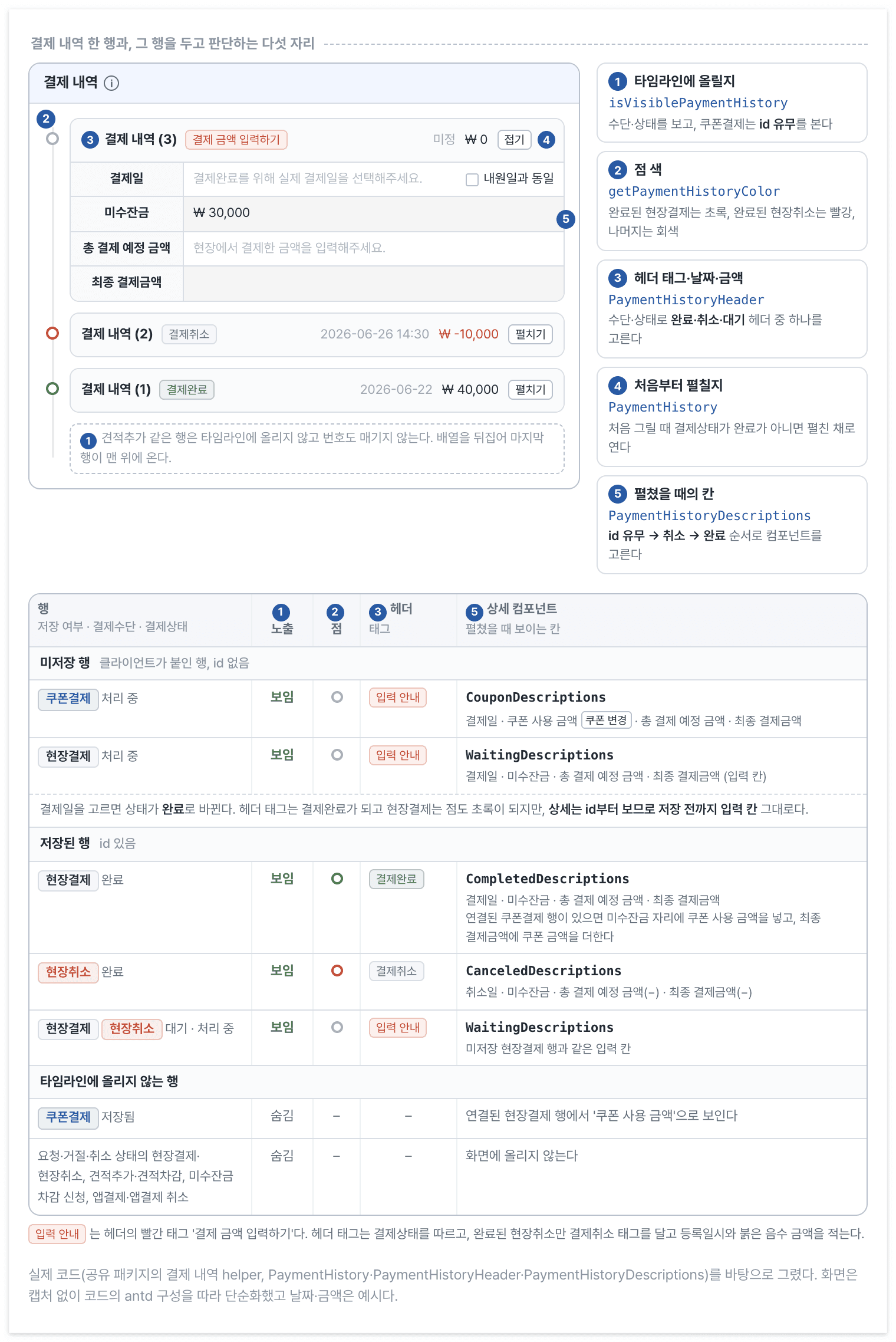
Visibility, dot color, header, expansion, and details make five separate decisions for one payment row. The table shows their outputs according to saved state, method, and status.
Show coupon rows while they are being edited
const VISIBLE_STATUSES = ['COMPLETED', 'PROCESSING', 'WAITING'] as const;
// as const만 쓰면 includes의 인자가 'NORMAL' | 'CANCEL'로 좁혀져
// payment.method를 받지 못하므로, 원소 타입을 method 전체 union으로 선언한다.
const VISIBLE_METHODS: readonly PaymentHistoryResponse['method'][] = [
  'NORMAL',
  'CANCEL',
];

function isVisiblePayment(payment: PaymentHistoryResponse | undefined) {
  if (!payment) return false;

  const isVisibleOnsitePayment =
    VISIBLE_STATUSES.includes(payment.status) &&
    VISIBLE_METHODS.includes(payment.method);

  const isEditingCoupon =
    payment.method === 'COUPON' && payment.id == null;

  return isVisibleOnsitePayment || isEditingCoupon;
}
A completed on-site payment already shows saved coupon usage. Showing the saved coupon row as well would split that transaction across rows. An unsaved coupon row must remain visible for selection, which is why isEditingCoupon checks both method and id.
The first coupon condition checked processing status. When I changed detail rendering to start with saved state, I aligned visibility with the absence of id too. Editing no longer meant one thing in visibility and another in detail selection.
Choose details by saved state first
import { P, match } from 'ts-pattern';

const isCanceledPayment = (payment: PaymentHistoryResponse | undefined) =>
  payment?.method === 'CANCEL' && payment.status === 'COMPLETED';

const isCompletedNormalPayment = (payment: PaymentHistoryResponse | undefined) =>
  payment?.method === 'NORMAL' && payment.status === 'COMPLETED';

function PaymentHistoryDescriptions({ field }: { field: FormListFieldData }) {
  const form = paymentForm.useFormInstance();
  const payment = paymentForm.useWatch(['payments', field.name], form);

  return (
    match(payment)
      // 미저장: 값이 없거나 id가 없다. 그 안에서 결제수단을 본다.
      .with(P.union(P.nullish, { id: P.optional(P.nullish) }), (unsaved) =>
        match(unsaved)
          .with({ method: 'COUPON' }, () => <CouponDescriptions field={field} />)
          .otherwise(() => <WaitingDescriptions field={field} />),
      )
      // 저장됨: 취소 → 완료 → 그 외
      .when(isCanceledPayment, () => <CanceledDescriptions field={field} />)
      .when(isCompletedNormalPayment, () => <CompletedDescriptions field={field} />)
      .otherwise(() => <WaitingDescriptions field={field} />)
  );
}
paymentForm is a publication alias for an antd Form wrapper with payment field types. useFormInstance and useWatch are antd APIs; field.name from Form.List is the payment array index.
An absent value or id selects an editing view, which then distinguishes coupons. Saved rows check completed cancellations, then completed on-site payments, and otherwise use pending details. Earlier conditions mixed coupon status with id and status elsewhere. This order makes each row's path to a component readable in one place.
Ts-pattern does not guarantee that a new method gets a view here. The input is not a full discriminated union and .otherwise() can absorb missing cases. I did not extend the change to parsing responses into a client union and using .exhaustive(). The change keeps the server response and existing views while gathering the branching logic.
Clear a coupon when the amount changes
function CouponDescriptions({ field }: { field: FormListFieldData }) {
  const { message } = App.useApp();
  const form = paymentForm.useFormInstance();
  const paymentAmount = paymentForm.useWatch(['payments', field.name, 'paymentAmount'], form);
  const memberCouponId = paymentForm.useWatch(['payments', field.name, 'memberCouponId'], form);
  const couponDiscountAmount =
    paymentForm.useWatch(['payments', field.name, 'couponDiscountAmount'], form) ?? 0;

  const finalAmount = (paymentAmount ?? 0) - couponDiscountAmount;

  // 금액은 Form.Item이 폼에 쓰고, 여기서는 적용된 쿠폰만 푼다.
  const handlePaymentAmountChange = () => {
    if (memberCouponId == null) return;

    form.setFields([
      { name: ['payments', field.name, 'memberCouponId'], value: null },
      { name: ['payments', field.name, 'couponName'], value: null },
      { name: ['payments', field.name, 'couponDiscountAmount'], value: 0 },
    ]);
    message.info('총 결제 예정 금액이 변경되어 적용된 쿠폰이 초기화되었습니다.');
  };

  return (
    <>
      <CouponSelector field={field} />
      <Form.Item name={[field.name, 'paymentAmount']} noStyle>
        <InputNumber onChange={handlePaymentAmountChange} />
      </Form.Item>
      <FinalAmount value={finalAmount} />
    </>
  );
}
Details receive field rather than an old payment snapshot. useWatch reads the current amount and coupon from the form path, and setFields clears the coupon after an amount change. The ordinary payment details and timeline do not need to know that calculation.
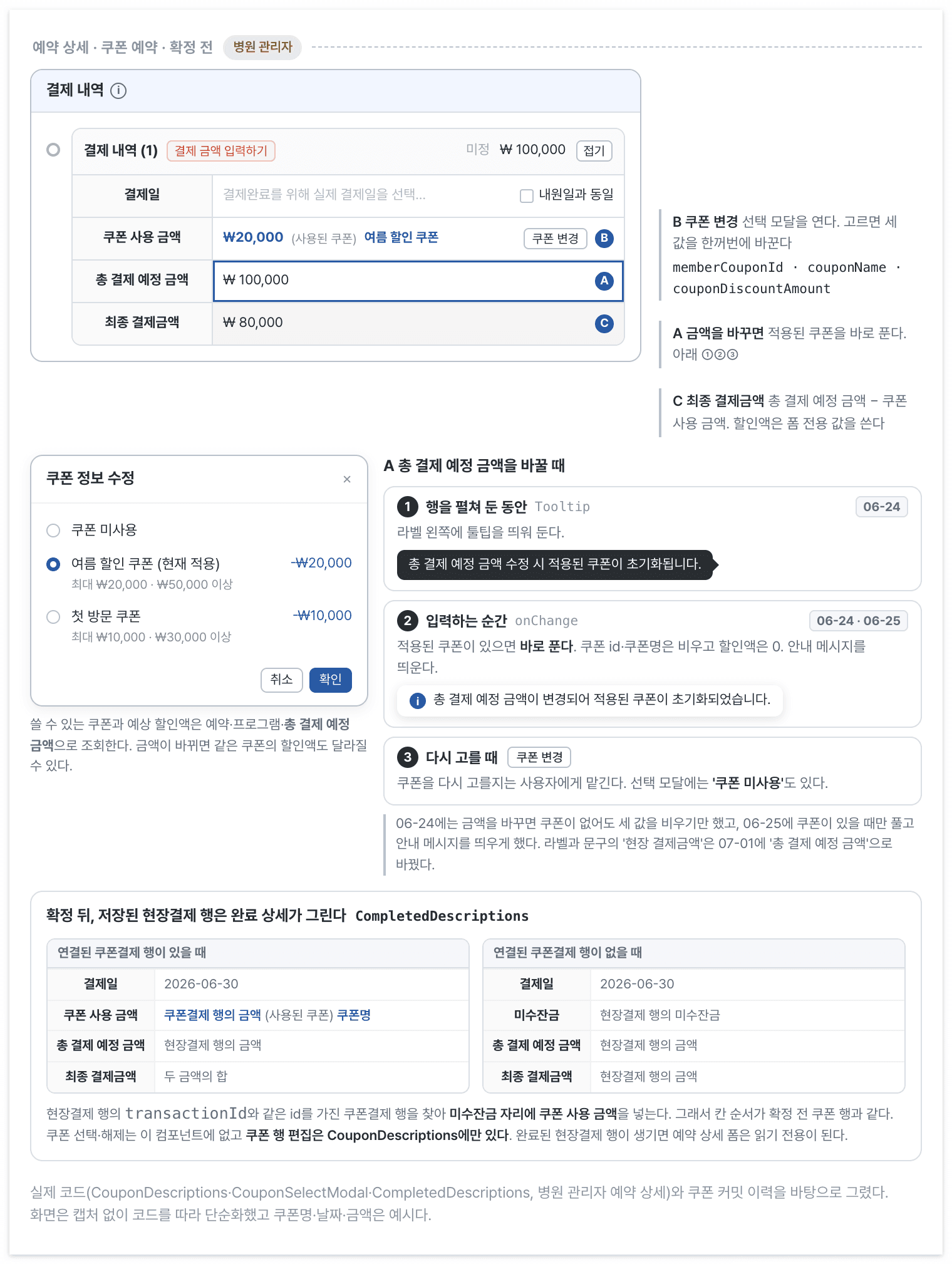
Changing the total expected amount before confirmation immediately clears the coupon and shows a notice. After confirmation, completion details find the linked coupon-payment row and display it in the same field order.
While a row is expanded, the amount label's tooltip warns that changing it clears the coupon. Changing the value also shows a notice. I added clearing and the tooltip first, followed by the notice. The label changed from on-site payment amount to total expected payment amount to describe the amount before applying a coupon.
The form does not automatically choose a replacement. Users can select another coupon or choose the modal's do-not-use option.
Replacing if with match did not fix the order
The first move from if to match preserved the old condition order. Splitting details into components still left id and status mixed, so the following day I grouped by saved state first. The decision order needed to change after the syntax did.
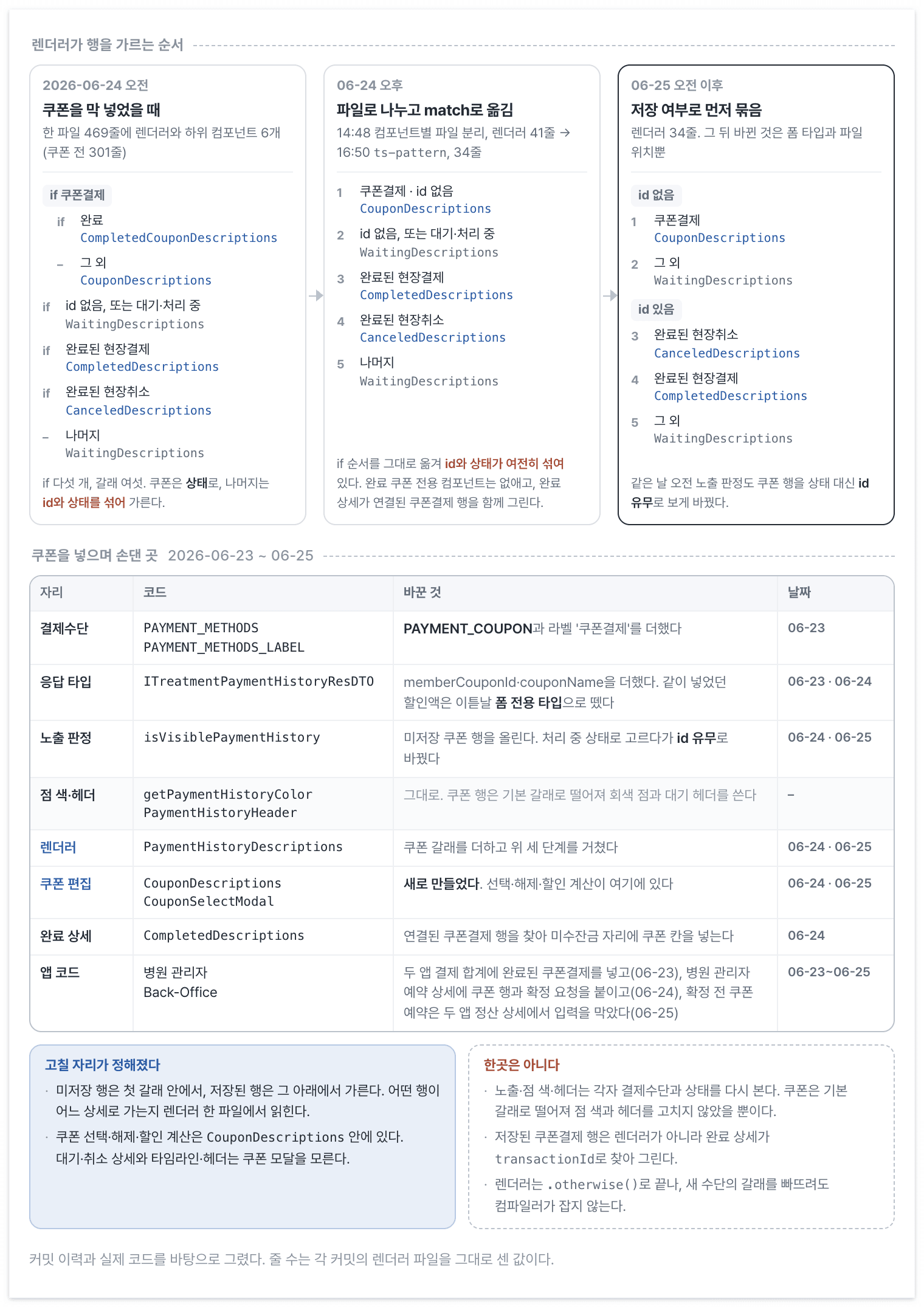
Five if branches on the first day became a match grouped by saved state the next day. The lower table lists the places changed to support coupons.
Coupons affected payment totals, settlement details, and reservation confirmation as well as detail views. Dot color and header retained their existing gray and pending fallbacks. A new payment method still needs those outputs considered separately from the detail renderer, and automated tests do not yet cover their combinations of method, status, and saved state.