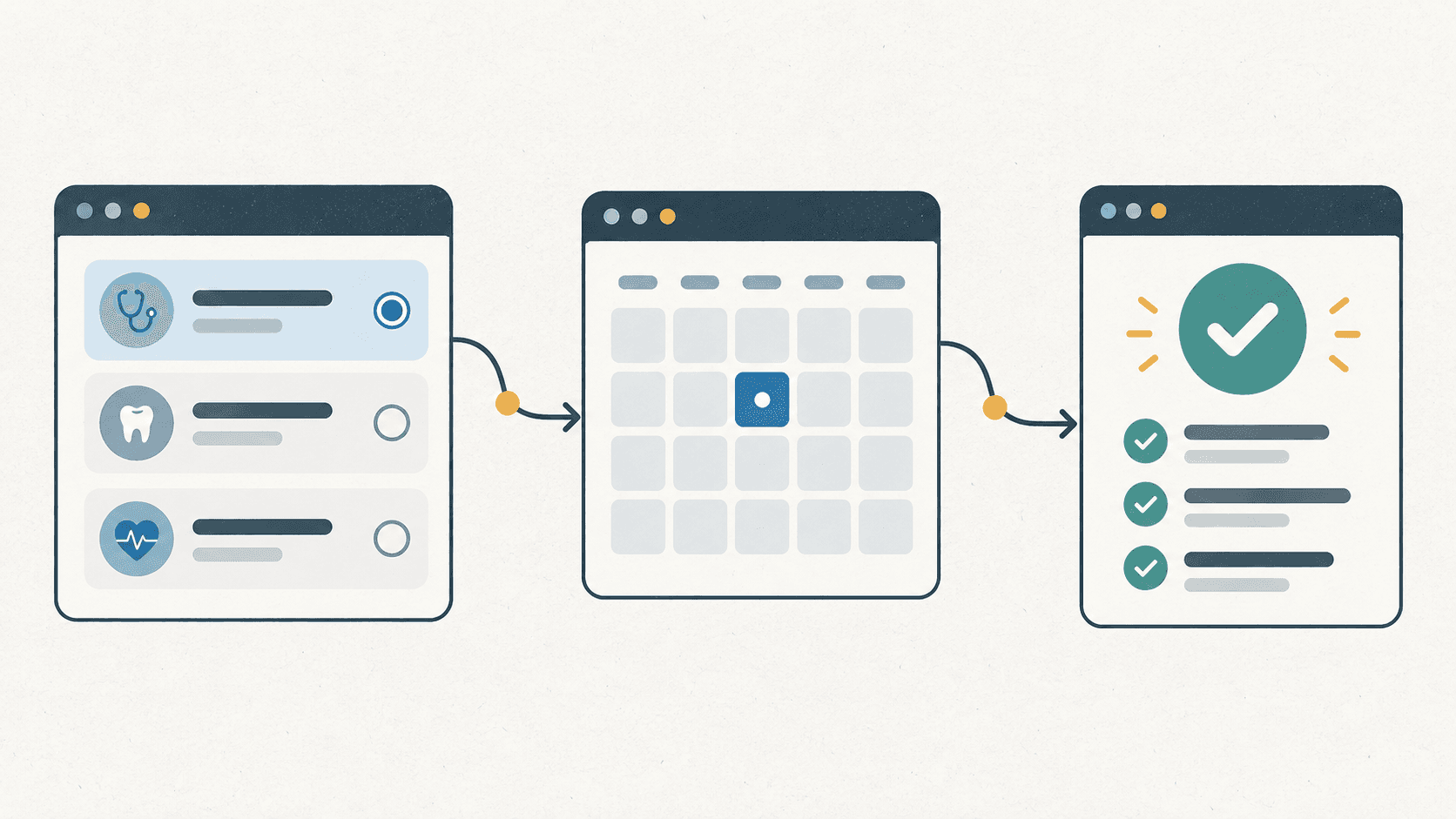
An illustration made for this article, rather than a screenshot of the service.
Health checks originally could not be booked inside Safedoc. Users read an external site and called to inquire. A partner asked to accept reservations through Safedoc, starting the work of adding health checks to existing programs.
Users now browse, apply, and pay in the portal. Hospitals and operations manage programs and reservations in their admin services.
Most Safedoc users arrive through partner companies. Too few hospitals make a desired region or examination hard to find, while hospitals need reservations to justify joining. This work connected existing partners' examinations to applications within the portal.
For existing non-covered treatment programs, hospitals registered and operations reviewed. Hospital admin submitted the request; Back-Office checked regulations and service policy before approval. Approved programs appeared in the portal for visit reservations. I had originally built those registration and review screens.
Health checks also use corporate codes, may require deposits, and combine basic examinations with groups requiring fixed selections. Adding a department to the existing form was not enough. I clarified missing behavior in the specifications with the development lead and deputy lead.
The diagrams were redrawn from screens I checked directly. Code includes only the relevant parts.
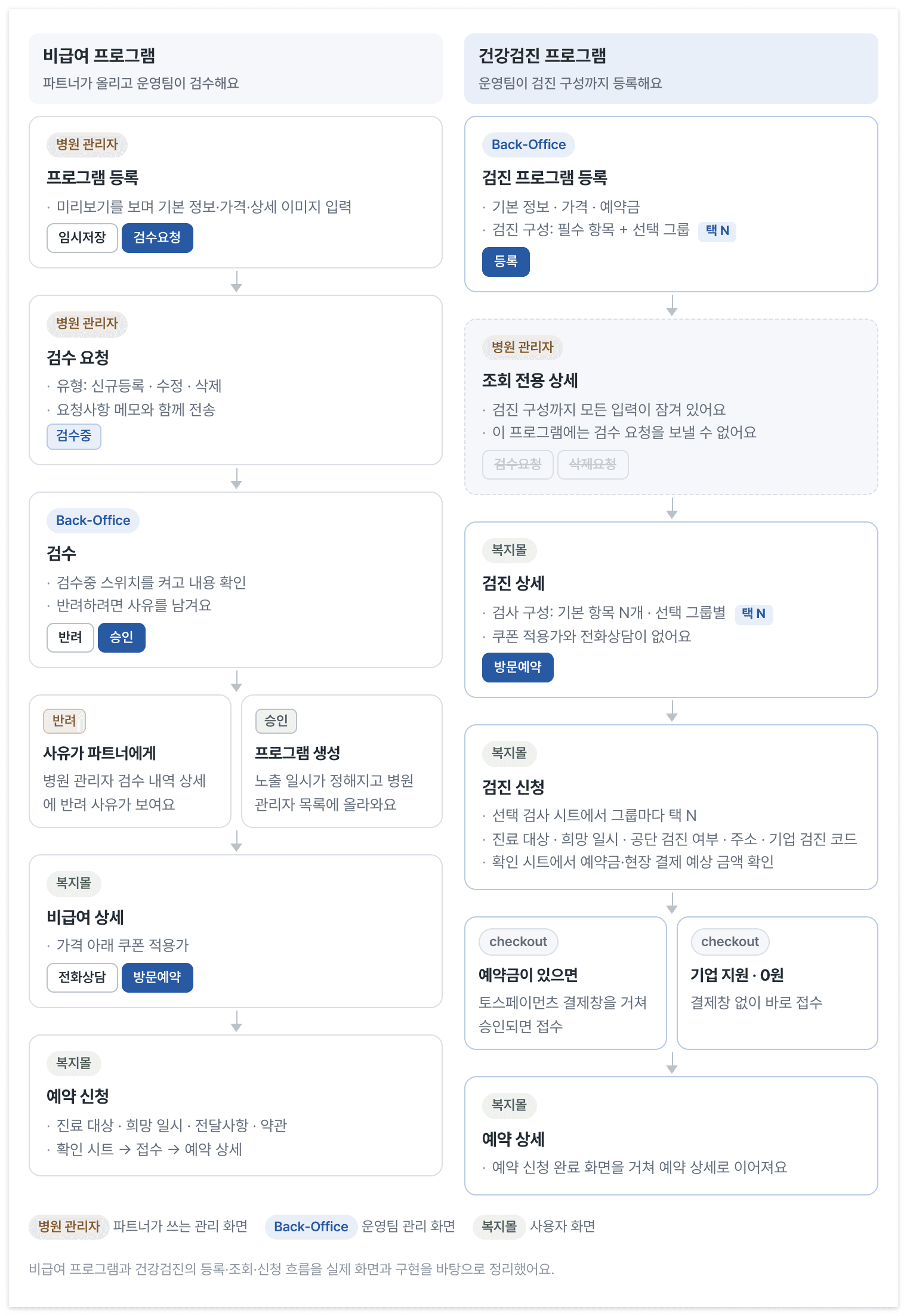
Treatment and health-check programs differ in who registers them and what happens after an application.
Restrict review by program rather than partner
A partner's registration, modification, or deletion request puts a treatment program under review. Operations can reject it with a reason recorded in hospital admin, or approve it to create the program and set its visibility time.
Operations registers health checks and their configuration directly in Back-Office. Hospitals only view the result, so review requests are unnecessary. Registration, deletion, review actions, and detail inputs needed to be disabled in hospital admin.
I initially locked a partner if any department was health checks. That also locked dermatology programs at mixed hospitals and removed their review menu. Locking a hospital and locking only its health-check program needed separate decisions.
- Program details use the fetched program's department, without depending on the partner query.
- Menus and lists become read-only only for partners whose sole department is health checks. They have no programs requiring review.
- Mixed partners use the same form for new registration, old drafts, and rejected-request resubmission. Its category validation rejects health-check departments, including those already present in drafts or rejected requests. This avoided a one-off prop on the shared cascader and enforced the rule in one place.
Health-check detection changed from department names to IDs. I gathered those comparisons into shared isHealthCheckDepartment and recorded next to the constant what the department API showed about IDs across environments.
Editing, locking, and selecting the same examinations
A configuration contains basic examinations and optional groups with a name, pickCount, and choices. Back-Office stores it; hospital admin displays it locked; the portal uses it for the detail summary and application choices.
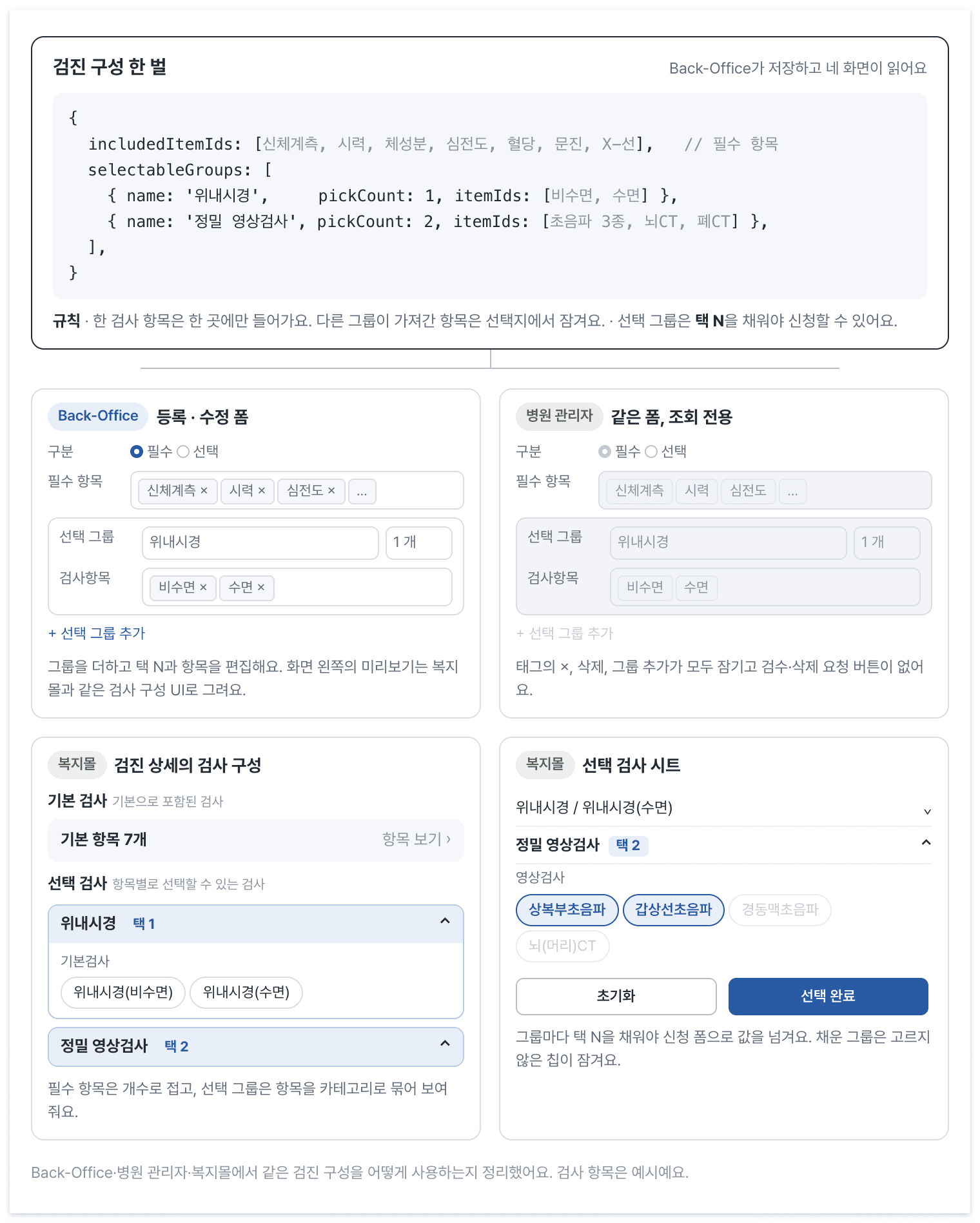
Back-Office edits the configuration, hospital admin displays it locked, and the portal renders summary and selection views.
Putting an examination in multiple groups can duplicate it in a reservation. Registration disables items already used by another group.
/** owner 를 뺀 나머지 그룹이 이미 가져간 검사항목 id. 다른 그룹의 선택지는 잠근다. */
export function getItemIdsTakenByOtherGroups(values: CompositionValues, owner: 'included' | number): number[] {
  const fromIncluded = owner === 'included' ? [] : (values.includedItemIds ?? []);
  const fromGroups = (values.selectableGroups ?? []).flatMap((group, index) =>
    index === owner ? [] : (group?.itemIds ?? []),
  );
  return uniq([...fromIncluded, ...fromGroups]);
}
I also made the preview resemble the portal. A table placing names in one line did not show the customer-facing configuration well. I reused the detail section, showing basic counts and grouped categories and chips. View Items remains visual only in preview, with groups expanded.
Switching a health check to another department exposed request ordering. Program saving could succeed while clearing configuration failed. Reloaded details then disabled configuration fetching because the program was no longer a health check, and retries closed without clearing the old data. A shared save hook now remembers failed clearing across create/edit modals and details. Its retry test follows that order.
A HEALTH_CHECK_ITEM_UNAVAILABLE rejection also came from a response containing a deleted examination. I sent that response to the backend engineer instead of quietly filtering it before saving.
Split detail screens instead of adding conditions everywhere
I could have added healthCheck branches to the treatment-detail screen a colleague had built. Removing coupons and phone consultation while adding examination configuration would have put branches throughout it.
Health checks have no coupon query or adjusted price and show examination configuration without phone consultation. Separate Views keep changes to either screen from requiring a tour through both sets of branches.
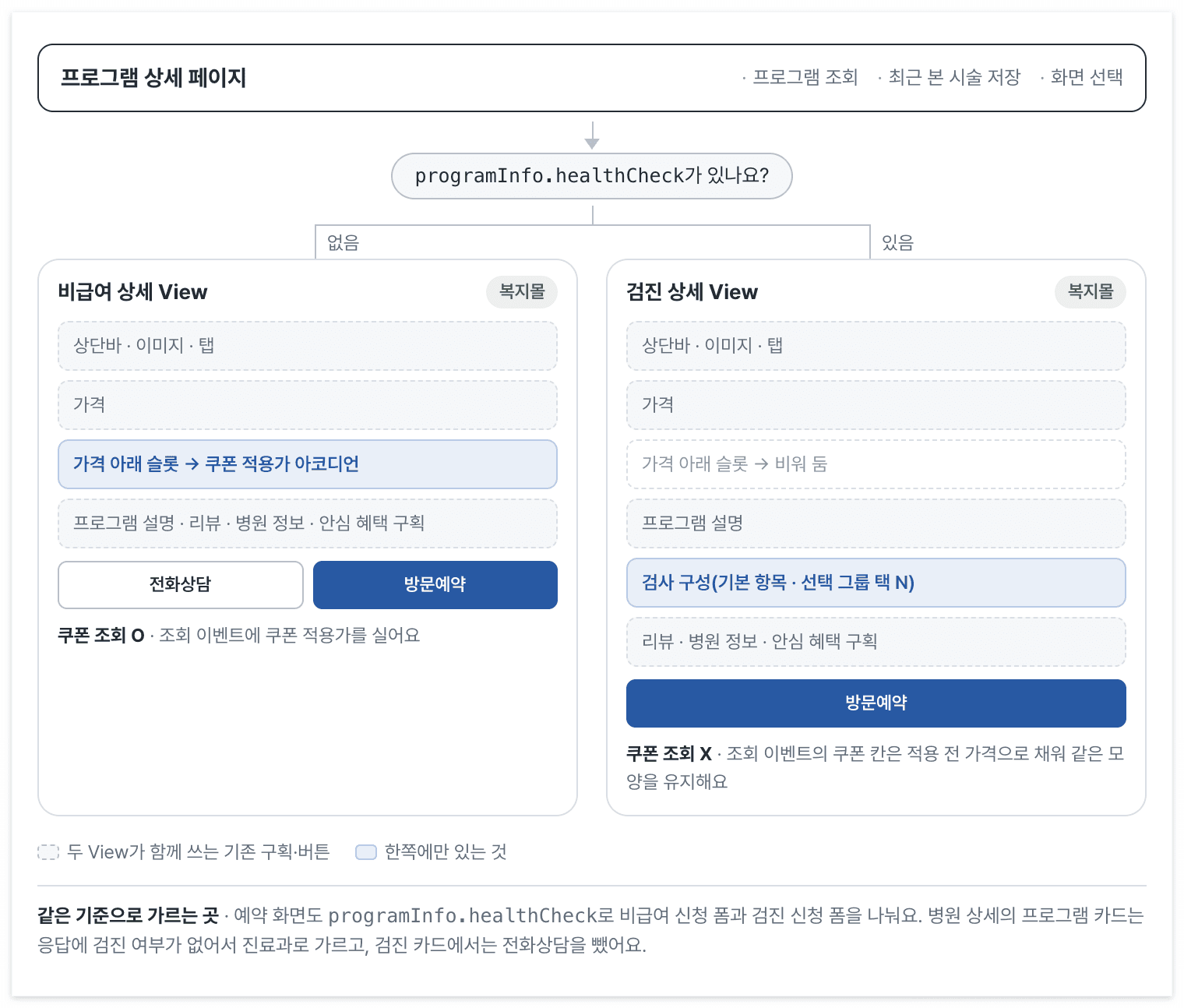
The detail page queries, records recently viewed programs, and chooses a screen. Each View assembles its own structure.
programInfo.healthCheck chooses the View, using the same value that chooses the application form.
// 설명을 위해 줄이고 이름을 바꾼 코드예요. 페이지는 조회·최근 본 시술 저장·화면 선택만 해요.
function ProgramPage({ programId }: Props) {
  const { data: program } = useQuery(programDetailOptions(programId));
  useSaveRecentProgram(program);

  if (!program) return null;

  return program.programInfo.healthCheck ? (
    <HealthCheckProgramDetailView program={program} />
  ) : (
    <ProgramDetailView program={program} />
  );
}
Each View declares its composition. They share existing sections, the top bar, logged-out and reservation buttons, post-authentication navigation, and event helpers. The price section takes a slot below its price instead of knowing about the coupon accordion. Treatment supplies coupon pricing; health checks leave it empty. Analytics events keep one shape, using the undiscounted price in health checks' coupon fields.
Application forms are separate too. Health checks need examination selection, national screening eligibility, address, corporate codes, and withdrawal notices. Treatment needs coupons and extra inquiries. Those fields no longer branch throughout a single form.
Hospital-detail cards could not use healthCheck because that list response lacked it. They use department information and omit phone consultation for health checks.
Disable remaining chips after N choices
Each optional group has a fixed count, such as two imaging tests. The initial request was to open the next group automatically when the current one became full.
Replacing an earlier choice would also fill the group and trigger that move. The implementation additionally removed the oldest choice when selection exceeded the limit. A chosen examination could disappear without notice, so I discussed that behavior and automatic advancement with the person responsible.
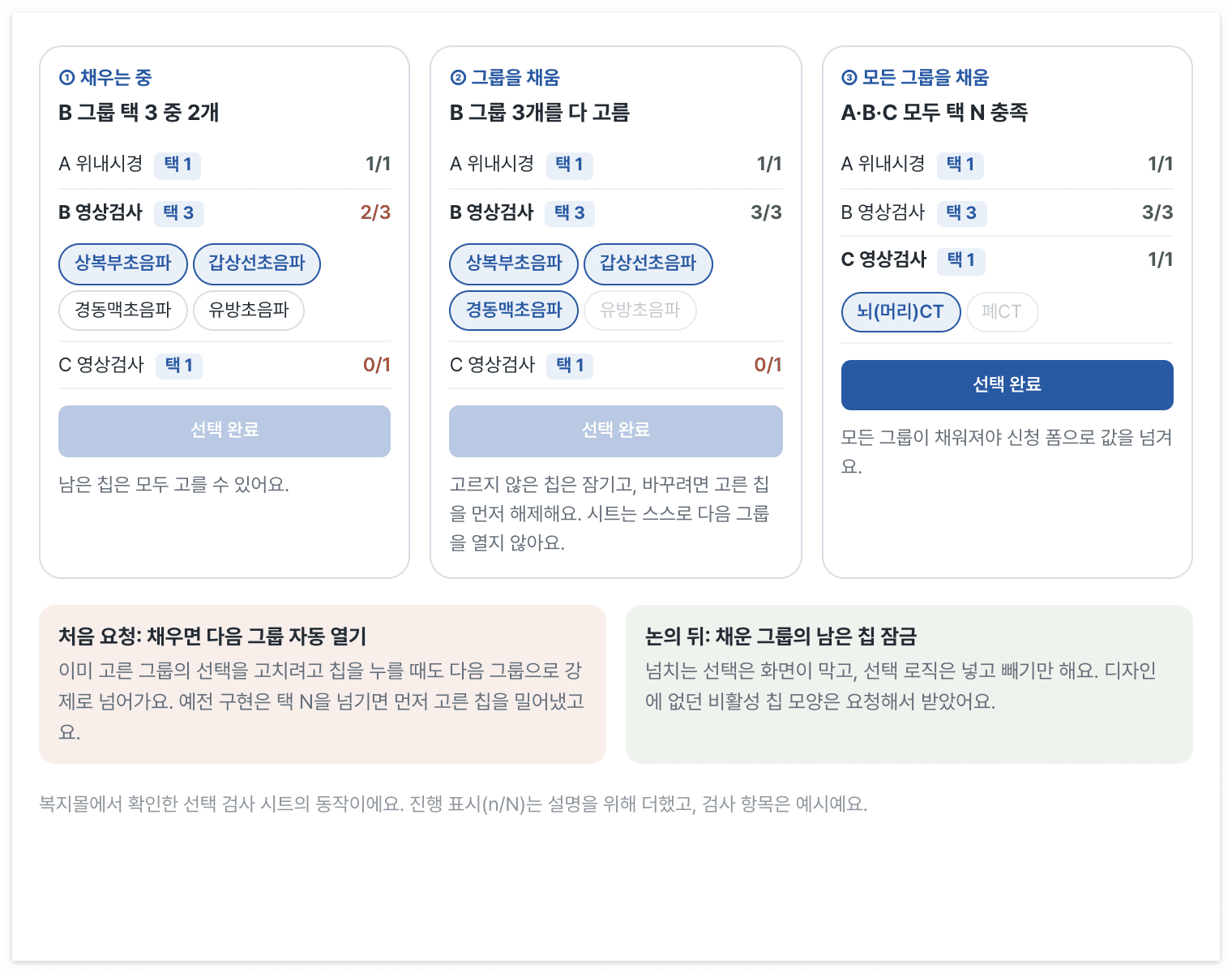
Completing a group disables unselected chips. Selection confirmation becomes available only after all groups are complete.
We chose to lock unselected chips when a group is full. Changing choices requires deselecting first. The sheet neither advances itself nor displaces earlier choices, leaving selection logic to add and remove entries.
// 선택 로직은 넣고 빼기만 해요. 밀어내기와 pickCount 인자를 걷어냈어요.
export const toggleHealthCheckItem = (selected: number[], itemId: number) =>
  selected.includes(itemId) ? selected.filter((id) => id !== itemId) : [...selected, itemId];

// 넘치는 선택은 화면이 막아요(설명을 위해 줄인 코드예요).
const isFull = selected.length >= group.pickCount;
<Chip pressed={isSelected} disabled={isFull && !isSelected} onClick={() => onToggle(item.id)} />;
The design lacked a disabled style, so I requested one for shared Chip and used it here. Tests changed from displacing old choices to locking full groups and unlocking after deselection. Removing the lock makes those tests fail.
Design the return path from payment failures first
Completing the application and amount-confirmation sheet leads to payment. During development, creation order changed too. Previously a reservation came first; checkout now decides whether payment is needed. Corporate-funded and zero-cost applications finish there, while deposit applications receive an order for payment. Routes, mocks, and E2E changed with this flow that no longer leaves unpaid reservations.
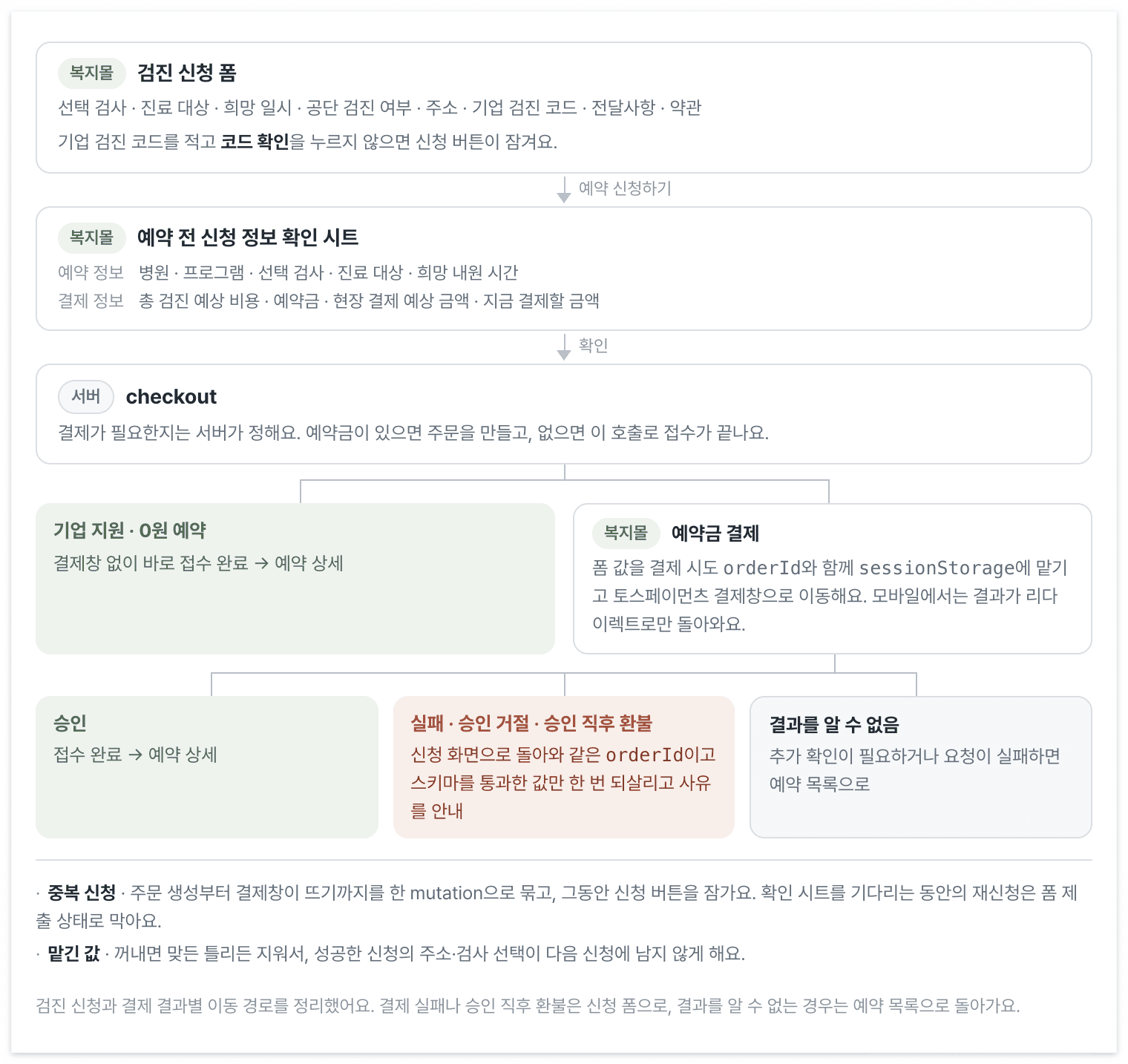
Each payment outcome has an explicit destination for the user.
Toss Payments returns mobile results through redirects, so page memory is gone on return. I save form values in sessionStorage with orderId and restore them once only for the matching attempt and current schema. Reading deletes the stored value whether valid or not, keeping old addresses and examinations out of the next application.
Payment testing found successful approval responses with REFUNDED status. Only cards and simple payments were allowed, yet quick bank transfer was selected by default. Paying that way triggered an immediate full refund with no reservation. Available methods come from provider-dashboard widget settings, not SDK options. I fixed the frontend result path that had sent users to history despite no reservation: return to the application, restore input, and explain why, like a payment failure. Only an unknown outcome goes to reservation history.
Checkout completion did not immediately open payment. During up to ten seconds waiting for the SDK, the button unlocked and another click created another order. One mutation now spans order creation through opening payment. Existing form-submission state blocks repeated clicks before the confirmation sheet opens.
Existing reservations still had to work beside health checks
Vitest covers selection locking, required agreements, and saving, restoring, and deleting payment handoff values. Dev-API E2E opens the Toss test widget and follows failure restoration, approval-request-failure navigation, and corporate examination codes.
Admin tests exercise mixed-department hospitals registering treatment programs and clearing configuration after a department change. Dev-API E2E and contract tests connect registration with reads. I also followed treatment registration, review, approval, and reservation in the screens, alongside health-check registration, application, and payment.