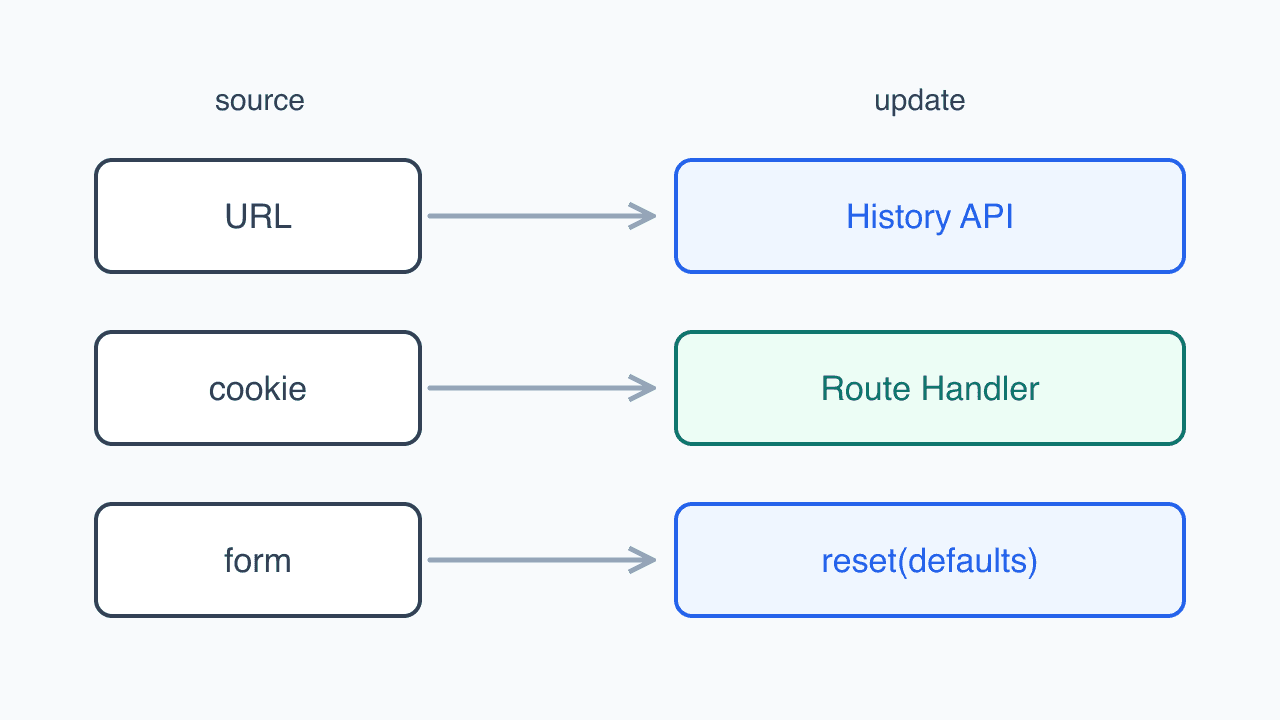
URL changes, cookie handling, and form initialization follow separate paths suited to their behavior.
Changing search conditions in a Back-Office list left the screen unchanged. router.replace was running, and the same code worked in the development server. Around the same time, upgraded admin screens lost chunks to CORS, and long-open tabs could no longer close a notice.
These looked like navigation or rendering failures, but had different causes. I revisited whether a URL change needed server navigation and whether cookie access needed a Server Action. The resulting changes also exposed conflicts between search forms and framework state preservation.
Search stopped after entering with query conditions
The staging lists searched normally when entered without conditions. After opening a link with conditions or refreshing that URL, submitting search changed neither the list nor the address.
The client fetches these lists; server rendering does not read searchParams. Router Cache was keyed by the search string used during server rendering rather than the request URL. That string was empty, so /a?foo=bar populated the cache slot also used for /a. The entry retained its original URL. A later router.replace('/a') reused it and restored foo=bar to the address and useSearchParams().
Upstream reports #92187 and #91658 described the same symptom. The explanation of the cache behavior came from fix #94144.
A detail Drawer that would not close was related. I initially wrapped closing in useTransition, thinking it waited for the server, then reverted it that day when it did not help. Entering through a list left a parameter-free URL cached, so closing worked. Entering details directly left prefetched ?id=… URLs that returned after clearing the parameter. Different entry paths produced different behavior.
The dev server on localhost did not reproduce it. Building the same code and running start reproduced the unchanged URL in six of seven Back-Office lists. Upstream reports also described a production-build-only failure.
I moved search submission, reset, and detail closing to native History API.
/**
 * 쿼리 파라미터만 바뀐 주소로 바꾼다.
 *
 * `router.replace` 를 쓰면 안 된다. 이 화면들은 서버 렌더에서 searchParams 를 읽지 않아
 * 라우터 캐시가 검색 문자열과 무관하게 재사용되고, 그 과정에서 캐시에 담긴 주소가 그대로 커밋된다.
 */
export function replaceUrl(url: string) {
  window.history.replaceState(null, '', url);
}

/** 뒤로가기로 되돌아갈 조건 변경(검색 등)은 엔트리를 남긴다. */
export function pushUrl(url: string) {
  window.history.pushState(null, '', url);
}
Next.js integrates with native history, updating usePathname and useSearchParams immediately. The Drawer test restores details after refresh, holds RSC requests, and closes the Drawer. It passes only if closing works without a server response. Running in development means it does not reproduce the cache bug itself, but it prevents closing from acquiring that server dependency again.
The client was responsible for fetching the list
After an address change, the client component calls useQuery with new conditions. A different key fetches the new list. Updating only the address works because the server has no list rendering to redo.
A screen that fetches from searchParams on the server and passes results as props is different. replaceState would update its address while leaving those props unchanged. It needs server navigation to receive new results.
A fixed cache does not make the round trip necessary
Even a working router.replace adds no benefit here. Router navigation for a same-path query change can generate a new RSC payload on a cache miss, adding server rendering and payload processing to the list request the client needs.
History API updates the address, and the query reading it fetches the data. I kept it for searches, filters, and tabs whose conditions the server does not consume.
The cache fix came in a version with another problem
The search-cache issue was fixed in 16.3.0. Core Changes included #94144, using the request URL's search string for the cache key.
The admin service had already retreated from 16.3. We upgraded from 14.2 on August 5, then returned to 16.2.12 two days later because client chunks failed to load.
Starting in 16.3.0, Turbopack serialized moduleLoading.crossOrigin in the client reference manifest as the string none instead of null. The option had become an enum, and its default None value was serialized as text.
16.2.12  "moduleLoading":{"prefix":"","crossOrigin":null}
16.3.0   "moduleLoading":{"prefix":"","crossOrigin":"none"}
React Flight treats strings other than use-credentials as the empty anonymous value. Even without configuring crossOrigin, SSR-preinitialized chunk scripts gained crossorigin="", and browsers requested them in CORS mode.
The fix omits serialization for CrossOrigin::None rather than restoring null. It merged to canary on August 12, 2026, in v16.3.1-canary.14, but the stable v16.3.1 source I inspected still lacked it. Moving from 16.3.0 to 16.3.1 was not enough.
Later, a portal upgrade to 16.3.6 for another reason produced a manifest without the field. Its prerendered HTML also lacked the empty crossorigin attribute.
Our setup differed from upstream's cross-origin assetPrefix/CDN case. We had no assetPrefix; a proxy redirected requests across domains.
Hospital admin's proxy sends certain pages to a designated host. It was middleware before Next.js 16. Its matcher also caught _next bundles, redirecting JavaScript requested on one host to the original host. The redirect combined with crossorigin="" produced CORS failures.
The matcher had been the same since 14.2. Bundles were already redirected in deployment, but local mode skipped host enforcement. Version 16.3 exposed that existing configuration problem.
I excluded static paths such as _next, leaving host enforcement for pages. Removing the cross-origin redirect stopped reproduction. I temporarily kept the admin monorepo on 16.2.x while waiting for the stable upstream fix, since other app settings could recreate similar conditions.
Old tabs kept calling old Server Actions
Hospital admin uses a cookie to decide whether to show its update notice. The inherited cookie was httpOnly and secure, so Server Actions read and wrote it.
A tab left open across deployment received 404 when calling that action. It held an old build's action ID, absent from the new server. IDs are tied to builds; the documentation also describes rotation at up to 14-day intervals without source changes. A user trying to dismiss a notice was now using an ID deployment had removed.
I first added a hotfix to reload after failure. Retrying the old bundle could not restore its ID. deploymentId can detect version differences and force hard navigation, and rolling deployment or retry paths can help handle the transition. None preserve the old action ID. I changed how cookies were accessed instead.
A Route Handler could retain httpOnly behind an /api/... URL independent of build IDs. I instead moved cookie access to the client, following an access-token change made two days earlier. The request interceptor reads that token for each request, and I wanted to avoid a Server Action round trip each time. I applied the same approach to the notice. Below, sessionToken and renewalToken are aliases for access and refresh tokens.
That reasoning did not fit the notice cookie. It is not read on every request. A Route Handler could have retained httpOnly; treating it like the token exposed it to JavaScript unnecessarily.
Cookie updates in a Server Action also rerender the current route and return its RSC payload. This is not a full reload or unmount, and client state stays intact, but it attaches a server render to dismissing a notice. I wanted to remove that round trip too.
A Route Handler now handles token refresh as a BFF. renewalToken stays httpOnly: the browser sends it on refresh requests for the handler to read. If the client cannot see sessionToken, it tries refresh once instead of immediately logging out. Old sessions had httpOnly access cookies invisible to JavaScript, so otherwise a valid session could end just after deployment.
Matching cookie names do not ensure replacement. Browsers identify cookies by name, domain, and path. Omitting path from document.cookie uses the document path, which may create a new value alongside the server cookie. The client can see a new value while the server receives an old one. That stale-token case does not reach an absent-token fallback.
Our cookies().set and js-cookie calls both defaulted to / without a domain, avoiding that combination. Scripts still could not overwrite old httpOnly cookies. The refresh Route Handler can replace sessionToken through Set-Cookie, but client-only notice code cannot read or overwrite its old cookie. Reusing the name would leave users who dismissed it before deployment unable to dismiss it for a day. I chose a new name and let the old one-day cookie expire.
Refreshing when sessionToken is invisible is a migration path for those old sessions. Retaining it after old httpOnly cookies expire would let a missing access token continue the session as long as renewalToken remained valid.
Removing deployment failures increased token exposure
Making sessionToken readable by JavaScript also makes it readable by third-party tags and dependencies running in the page. Besides XSS, client tools that collect cookies or request headers can reach it.
A shorter access-token lifetime limits reuse of one stolen token. Persistent malicious code that can read refresh responses can obtain the next token too. Short expiry does not stop active XSS.
HttpOnly keeps JavaScript from directly reading renewalToken; it does not prevent requests carrying that cookie. Access to refresh responses and any endpoint returning cookie values still matter. Shorter token expiry and restrictions on refresh have not yet been added.
Back navigation restored the list but left the search input
Once conditions lived in the URL, the form needed to follow it. Initially it used only the address at entry.
// 진입 시점의 주소가 폼의 초기값이다. 이후 주소 변경은 폼을 건드리지 않는다.
const [initialValues] = useState(() => ({ ...defaultValues, ...currentParams }));
The list fetched from the current address, while the search form stopped reading it after initialization. Going back restored old results but left the latest text in the input. I reset the form after address changes because changing initialValues alone does not update values stored by rc-field-form.
// currentParams 는 매 렌더 새 객체라, 내용이 달라졌을 때만 초기값을 다시 만든다.
const paramsKey = JSON.stringify(currentParams);
const initialValues = useMemo(() => ({ ...defaultValues, ...currentParams }), [paramsKey]);

useEffect(() => {
  form.resetFields();
}, [form, initialValues]);
The reset then watched too much. It observed all parameters, including page number and the Drawer's id. Opening and closing a row while drafting a search erased the unfinished input. Pagination did the same.
I knew about that behavior when synchronizing the form and left it in place. Not every URL change needs a reset. The code already distinguishes form-input keys from address-only keys; resetting only when input keys change would avoid it. That change remains unfinished.
The framework retained forms that needed resetting
The portal had the opposite problem: submitted values remained. After enabling Cache Components in June to reduce sitemap generation costs, going back after a reservation or consultation restored the old input.
Next.js hides the previous page through React Activity rather than unmounting it. Its display:none DOM and React state remain in the document. The documentation describes retaining up to three recent routes before evicting older ones.
I handled resetting in the shared form hook, called useSchemaForm here. July's approach reset on reveal, but old input appeared briefly. On August 5 I changed it to reset when the form became hidden.
export function useSchemaForm({ schema, ...props }) {
  const form = useForm({ ...props, resolver: zodResolver(schema) });
  const { reset } = form;

  // Cache Components 는 떠난 라우트를 언마운트하지 않고 <Activity> 로 숨겨 입력값을 그대로 보존한다.
  // 폼은 들어올 때마다 새로 시작해야 하므로 화면이 숨겨질 때 초기값으로 되돌린다.
  useIsomorphicLayoutEffect(() => reset, [reset]);

  return form;
}
Reset is the cleanup function. React runs cleanup when Activity hides the screen, restoring defaults then. React-use's useIsomorphicLayoutEffect uses useLayoutEffect in the browser. This timing avoids the frame of old input I saw when resetting after reveal.
Defaults are not an empty form. Reservation entry preselects the coupon with the greatest benefit; clearing everything would remove that selection too. I restore mounting-time defaultValues and mount forms with server-derived defaults only after their data is ready.
Tests retain input during use and ordinary rerenders, then restore defaults rather than empty values after cleanup. Reservation tests also cover returning from another screen, forward navigation, and reentry after submission: old input disappears and the best coupon is selected again.
I initially considered using bfcacheId as a key, but its documentation showed why it would not fix back navigation.
bfcacheId changes when push or replace creates a new segment; it remains for back/forward navigation, router.refresh(), and search-only or hash-only navigation.
Submission leaves the form segment rather than recreating it. Going back restores the same segment and bfcacheId, so the key remains unchanged. A new push from completion to the form can differ, but the documentation still prefers an explicit reset or data-derived key for new code. This form needed its defaults restored when leaving.
References
- vercel/next.js #92187, #91658: incorrect search parameters in Router Cache
- Next.js PR #94144: request-URL search as cache key, in 16.3.0
- Next.js #96831, PR #97164: crossOrigin manifest serialization
- Next.js: window.history.pushState
- Next.js: Server Action deployment considerations
- Next.js: version skew and deploymentId
- Next.js: preserving UI state
- Next.js: bfcacheId
- Related: Moving reservation form state from Zustand to React Hook Form: a caller of the shared form hook
- Related: Separating public and authenticated reads in a sitemap: why Cache Components was enabled
- Related: Letting failed sections recover with Error Boundaries: URL-opened Drawers and recovery