An illustration of the topic, rather than an actual product screenshot or exact architecture diagram.
A reservation bug appeared after adding a family member: date selection still behaved according to the old number of people. The screen selected dates, times, and participants, but several places changed those values.
React Query held the family list. Zustand stored participants and their dates again, while component-local state held the latest date choice. Changing one required copying values to the others, and adding a person involved both cache and store.
I left the server list in React Query, moved selection and preferred dates into the form, and gathered submission rules in Zod. The important change was avoiding the repeated reconciliation of the same choices.
Every value change also updated stored validity
The Zustand store held the draft and isValid together.
type BookingDraftStore = {
  form: Partial<BookingFormValues>;
  isValid: boolean;
  updateParticipant: (
    memberId: number,
    values: Partial<ParticipantDraft>,) => void;
  applyScheduleToAll: (date: string, time: string) => void;
};
Actions changing participants or dates ended with validateDraft.
updateParticipant: (memberId, values) =>
  set((state) => {
    // 값 수정
    state.isValid = validateDraft(state.form);
  });
Existing actions called it, but a new action could omit it and leave the button reading old validity for new values. Family additions and removals also required aligning people in the cache with the store array.
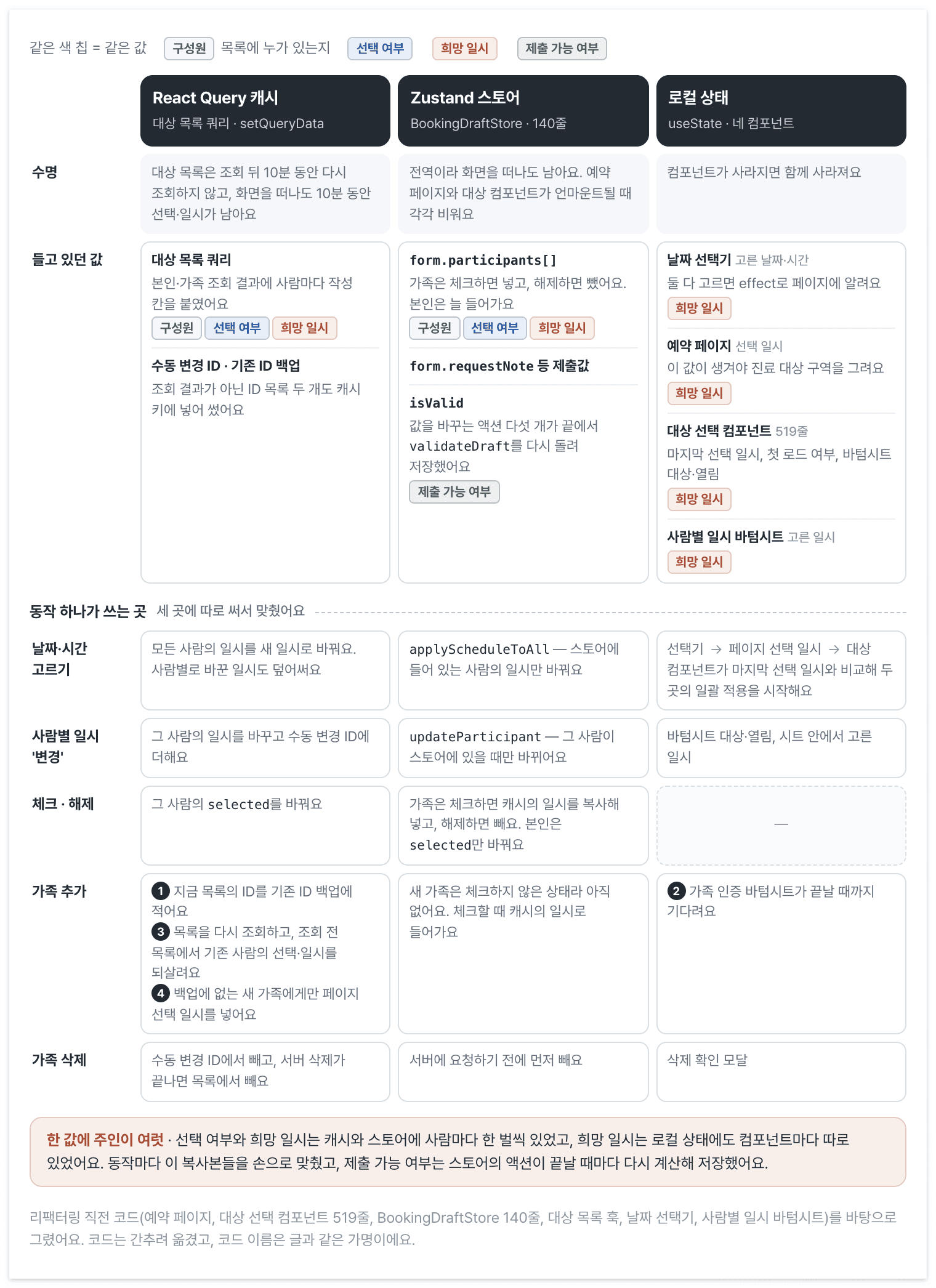
Before refactoring, each person's selection and preferred date/time existed in both React Query and Zustand. Preferred dates also appeared in component-local state.
Adding a family member backed up existing IDs, refetched the list, restored selections and dates, and supplied a date to the new person. Yet the store received that person only after they were checked. The cache and store could therefore hold independently changing dates for the same person.
Zustand itself was not the cause. Server membership data had been mixed with ongoing selections and dates, then copied into another store.
Read people from the server and edit selections in the form
React Query now supplies names and family membership. React Hook Form holds selected people and preferred dates; Zod derives validity from them. Only the picker's display and unconfirmed sheet choices remain local.
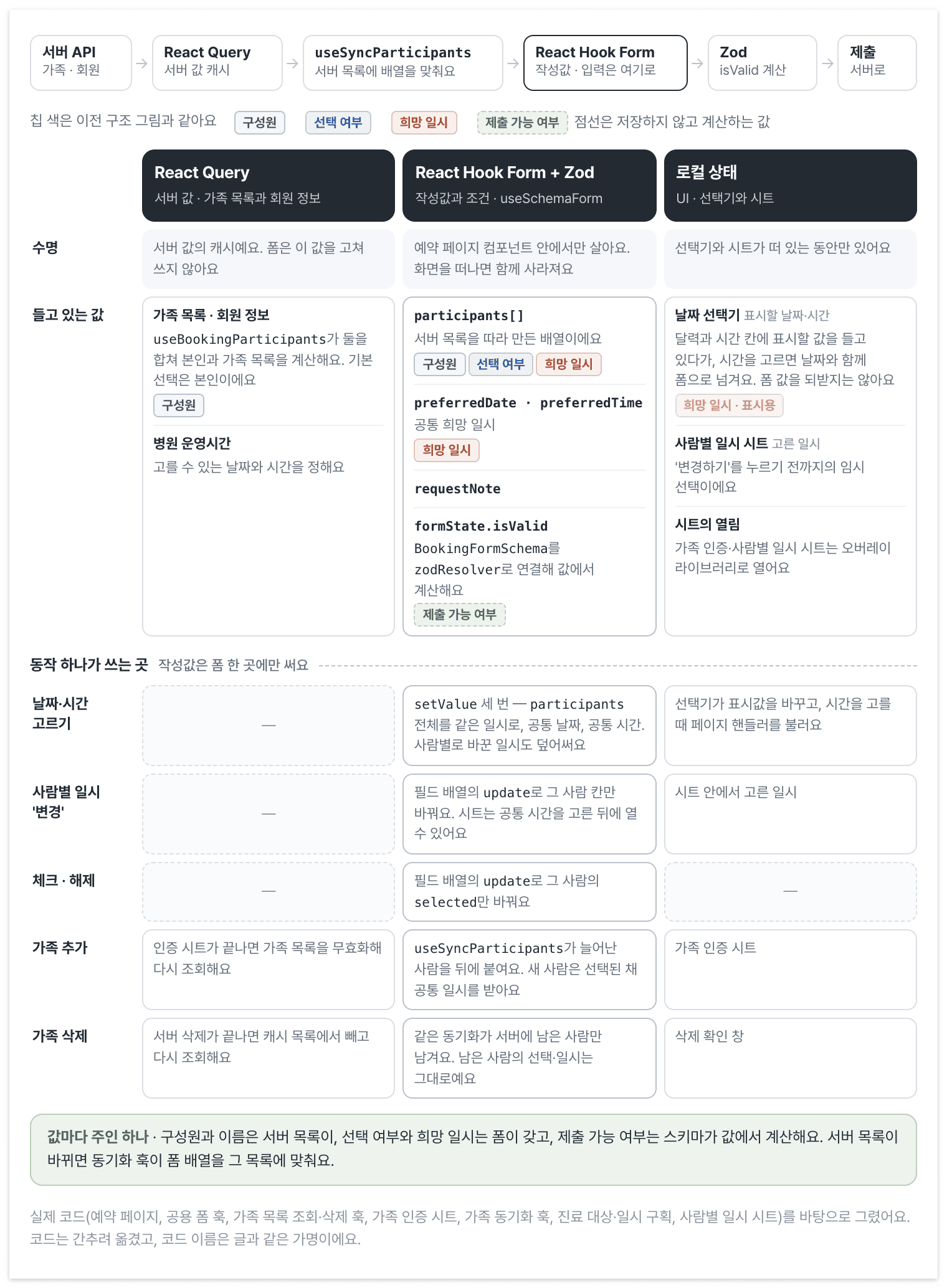
After refactoring, edits are written only to the form. A synchronization hook aligns its array when the server list changes.
The picker display is separate from submitted values too. A sheet keeps temporary choices until confirmation writes them to the form. The overlay library opens and closes the sheet.
Other screens do not need to share the reservation draft, so I placed FormProvider on the page. A shared hook called useSchemaForm connects zodResolver, and a synchronization hook in ParticipantSelector fills the initially empty participants array from the server. Both names are publication aliases.
function BookingPage() {
  const methods = useSchemaForm({
    schema: BookingFormSchema,
    defaultValues: {
      participants: [],
    },
  });

  // handleScheduleSelect는 아래 '날짜 일괄 적용' 절에서 다룬다.

  return (
    <FormProvider {...methods}>
      <ScheduleSection onSelect={handleScheduleSelect} />
      <ParticipantSelector />
      <RequestNoteField />
      <TermsSection />
      <SubmitButton />
    </FormProvider>
  );
}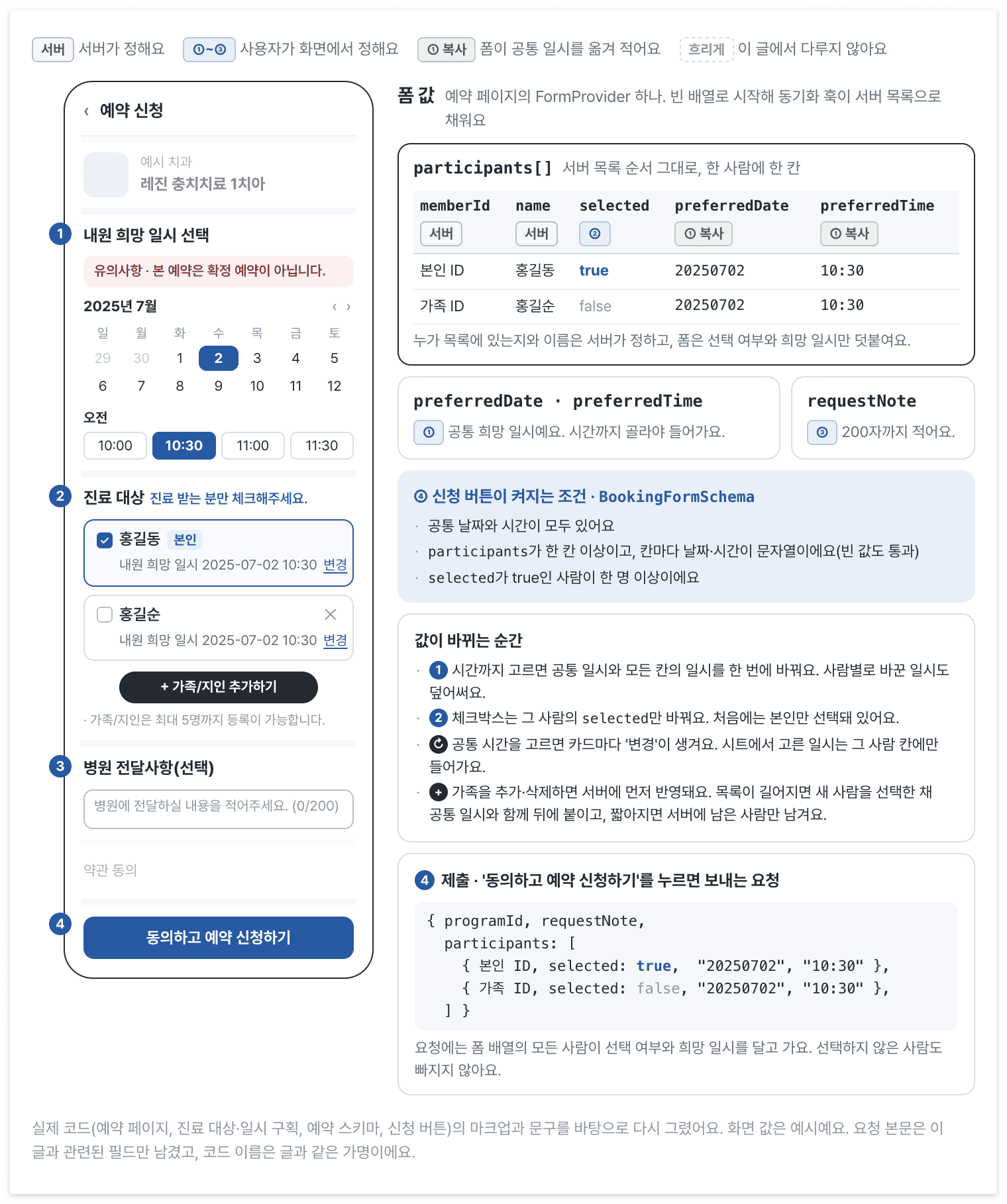
After a time is selected, the form copies the common date/time to every participant. The application button becomes available when all schema conditions pass.
The participants array contains server-owned names and IDs alongside user-edited selections and dates. Requests include unselected people with their selected flag too. Refetching server membership must therefore preserve the choices already made in the form.
Creating the form within the page also removed screen-specific cleanup code that emptied the global Zustand store.
Read validity from the form, but inspect when it recalculates
I moved reservation conditions into this schema.
const ParticipantSchema = z.object({
  memberId: z.number(),
  selected: z.boolean(),
  name: z.string(),
  preferredDate: z.string({ message: '희망 날짜를 입력해 주세요.' }),
  preferredTime: z.string({ message: '희망 시간을 입력해 주세요.' }),
});

export const BookingFormSchema = z
  .object({
    requestNote: z.string().max(200, '최대 200자까지 입력할 수 있어요.').optional(),
    participants: z
      .array(ParticipantSchema)
      .min(1, '가족 예약이 최소 한 명 이상 있어야 합니다.')
      .default([]),
    preferredDate: z.string(),
    preferredTime: z.string(),
  })
  .superRefine((data, ctx) => {
    if (data.participants.some((participant) => participant.selected)) return;

    ctx.addIssue({
      code: z.ZodIssueCode.custom,
      path: ['participants'],
      message: '최소 한 명은 예약 대상이어야 합니다.',
    });
  });
Submission requires a selected person and common preferredDate and preferredTime values. Per-person dates and times are checked only as strings. Until the picker completes time selection, the common values are not ready and submission remains unavailable.
The button reads formState.isValid instead of another validity state. The schema defines error locations and messages, although this screen still shows invalidity only by disabling the button rather than displaying field errors.
Moving to a library did not make validation timing explicit. Neither useSchemaForm nor its reservation caller sets mode. The date handler omits shouldValidate on setValue, while checkboxes and individual date edits use useFieldArray.update.
Following the React Hook Form 7.56 source showed why the button still updates: participants is a field array. Subscribing to isValid recalculates validity for registered or Controller-connected input changes even in default submit mode. A standalone setValue without shouldValidate does not. Here setValue replaces the whole array managed by useFieldArray, which recalculates validity after the change.
Changing only date fields without touching that array could bypass this behavior. Values could update while the button stayed unchanged. Explicit caller mode or shouldValidate on the relevant updates remains an unfinished change.
Reflect family changes without discarding ongoing edits
Refetching family membership must not erase chosen dates. useBookingParticipants combines member information and the family query with the member first. The synchronization hook aligns the form to that list and leaves it alone while member information is null.
// 새 칸을 만드는 함수: 서버 값에 폼의 공통 희망 일시를 붙인다.
function useParticipantInitializer(control: Control<BookingFormValues>) {
  const preferredDate = useWatch({ control, name: 'preferredDate' }) ?? '';
  const preferredTime = useWatch({ control, name: 'preferredTime' }) ?? '';

  const initParticipant = useCallback(
    (override: Partial<Participant> = {}) =>
      <T extends { memberId: number; name: string }>(base: T) => ({
        ...base,
        preferredDate,
        preferredTime,
        ...override,
      }),
    [preferredDate, preferredTime],
  );

  return { initParticipant };
}

function useSyncParticipants() {
  const { control, setValue } = useFormContext<BookingFormValues>();
  const current = useWatch({ control, name: 'participants' });
  const serverParticipants = useBookingParticipants();
  const { initParticipant } = useParticipantInitializer(control);

  useEffect(() => {
    if (serverParticipants === null) return;

    // 처음: 서버 목록 전체로 채운다.
    if (current.length === 0) {
      setValue('participants', serverParticipants.map(initParticipant()));
      return;
    }
    // 서버 목록이 짧아졌다: 서버에 남은 사람만 남긴다.
    if (current.length > serverParticipants.length) {
      setValue(
        'participants',
        intersectionBy(current, serverParticipants, (p) => p.memberId),
      );
      return;
    }
    // 서버 목록이 길어졌다: 폼에 없는 사람을 선택한 채로 뒤에 붙인다.
    if (current.length < serverParticipants.length) {
      setValue('participants', [
        ...current,
        ...differenceBy(serverParticipants, current, (p) => p.memberId).map(
          initParticipant({ selected: true }),
        ),
      ]);
    }
  }, [serverParticipants, current, initParticipant, setValue]);
}
Initial population uses server defaults: the member starts selected and existing family members unselected. A family member added afterward arrives with selected: true and immediately joins the reservation.
InitParticipant reads the common preferredDate and preferredTime from the form for each new person. Adding someone after choosing a date supplies that date to the new row. Existing people retain their current form values, preserving individual selections and schedules.
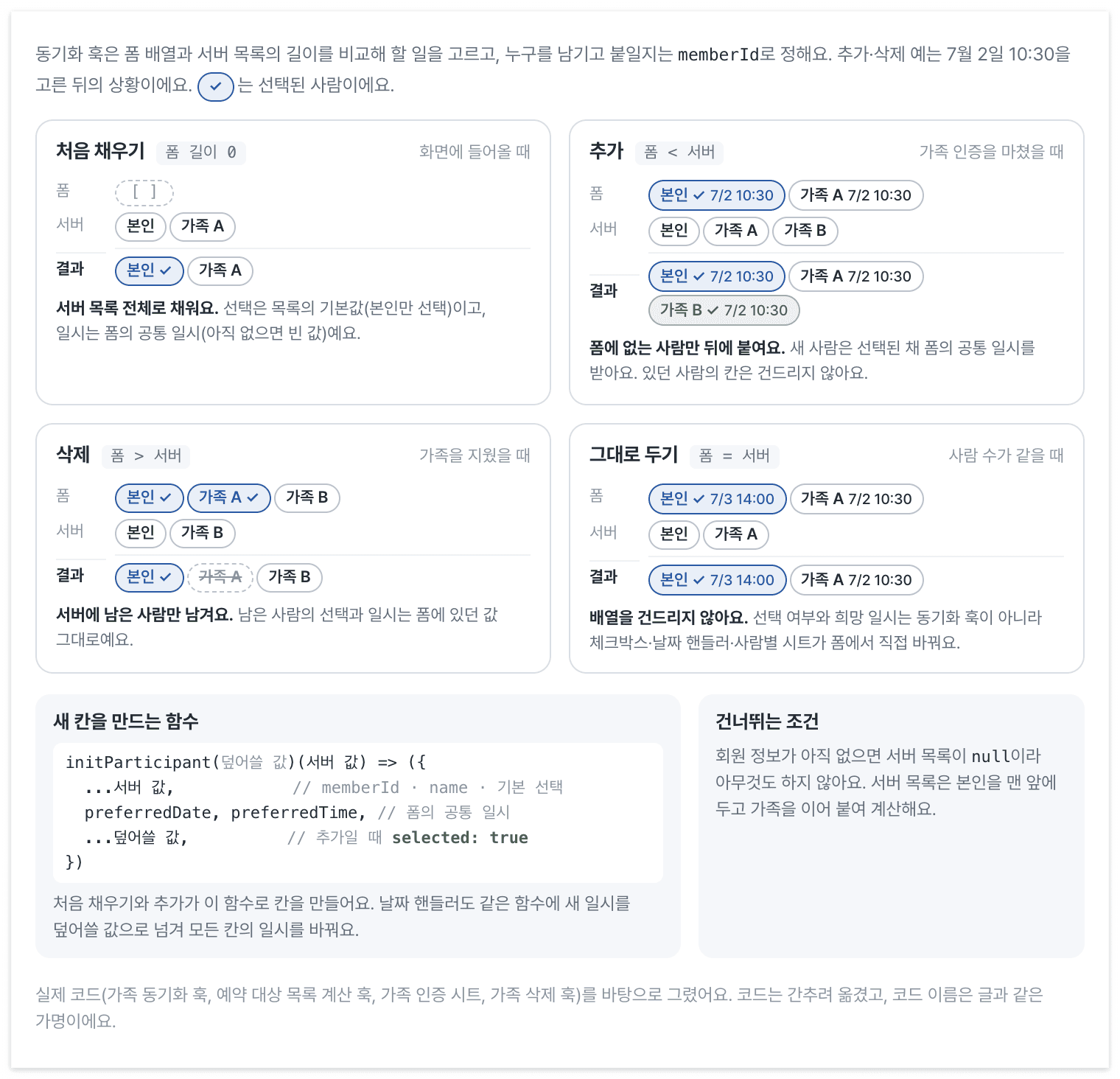
Four branches synchronize the form with the server list. Length chooses the operation; memberId identifies which people to retain or add. New entries receive the form's common preferred date/time.
This implementation reconciles people only when array lengths differ. A replaced memberId at the same count or a name-only change leaves the array untouched. It handles additions and removals, not every same-length replacement or refreshed server field.
Write common and individual schedules into the form
The picker emits date and time together after time selection. The page handler writes both the common fields and each participant's schedule.
const handleScheduleSelect = useCallback(
  ({ date, time }: { date: string; time: string }) => {
    const participants = methods.getValues('participants');

    // 날짜·시간 형식 변환은 생략
    methods.setValue(
      'participants',
      participants.map(initParticipant({ preferredDate: date, preferredTime: time })),
    );
    methods.setValue('preferredDate', date);
    methods.setValue('preferredTime', time);
  },
  [methods, initParticipant],
);
Passing the new schedule as overrides to initParticipant preserves selection. Choosing a common time reveals a change action on each person's card; confirming an individual sheet updates that person through useFieldArray.update. Choosing another common schedule overwrites individual changes too.
Only the participant-list component calls useFieldArray. The page handler and synchronization hook replace the array through setValue without shouldDirty or shouldValidate. That is the path responsible for the button behavior described earlier.
A form still needs a connection to server membership
ParticipantSelector assembles the selection UI, with family selection in a child component. A separate hook reflects the server list in the form array. I removed the Zustand store after separating code that had coordinated the cache, store, and local state to keep dates aligned.
React Hook Form still needs Controller connections for custom inputs and synchronization between server membership and ongoing edits. This form also leaves validation and dirty updates implicit, relying on field-array behavior. Automated synchronization tests have not yet been added.
The source of a new family member's common date is now inside the form. Adding it no longer involves backing up selections in the cache and restoring them in the store.