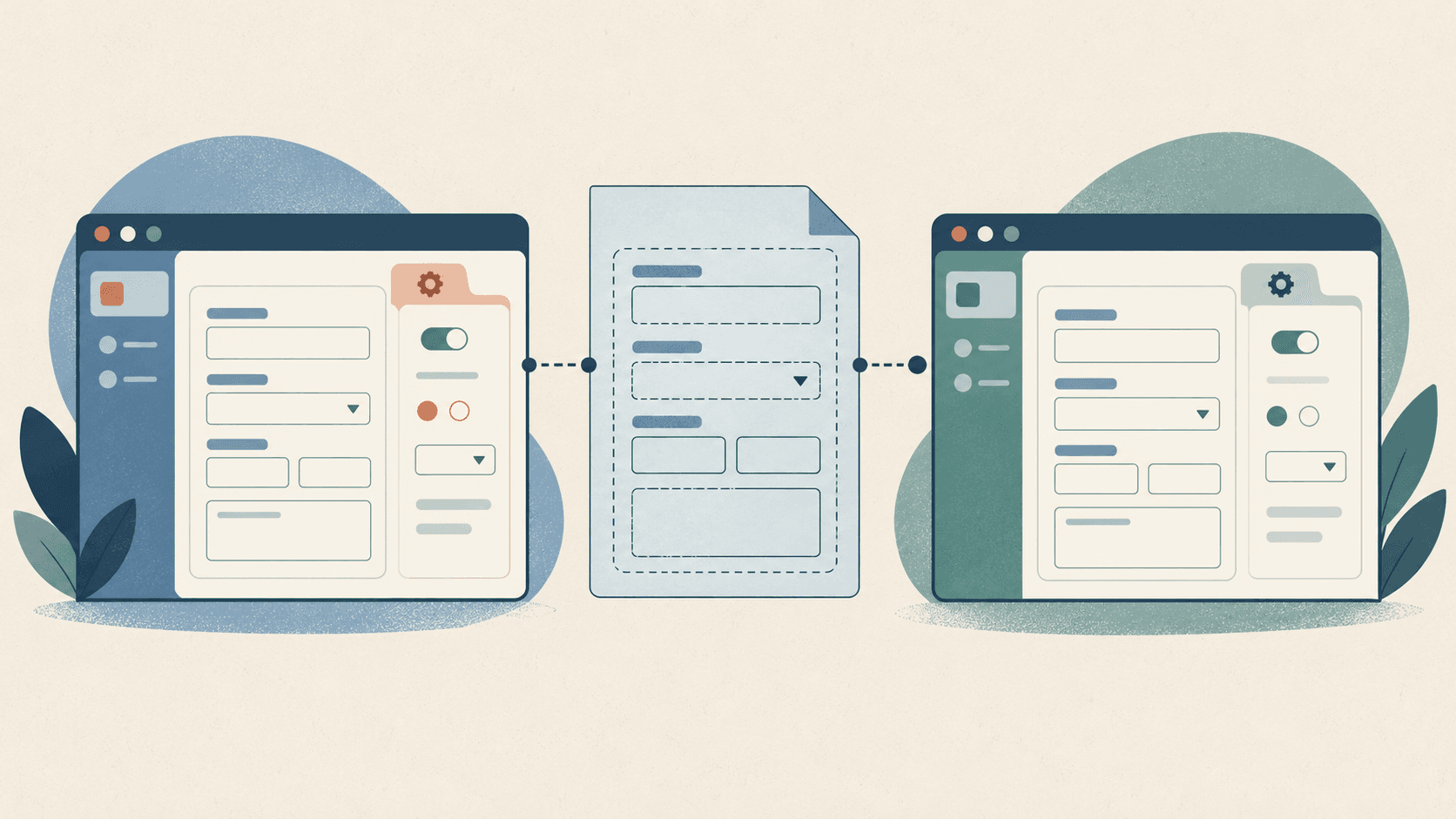
An illustration of the topic, rather than an actual product screenshot or exact architecture diagram.
Changing a program input meant finding its FormItem in both hospital admin and Back-Office. Recommended patients, equipment, and precautions also appeared in the sub-treatment template editor. The same input had several separate implementations.
Submission was different in each app. Hospital administrators register programs and request review; Back-Office approves or rejects those requests. Operational notes and visibility settings belong to Back-Office, while requester and review-request details belong to hospital admin. Combining both forms wholesale would bring those differences into shared code too.
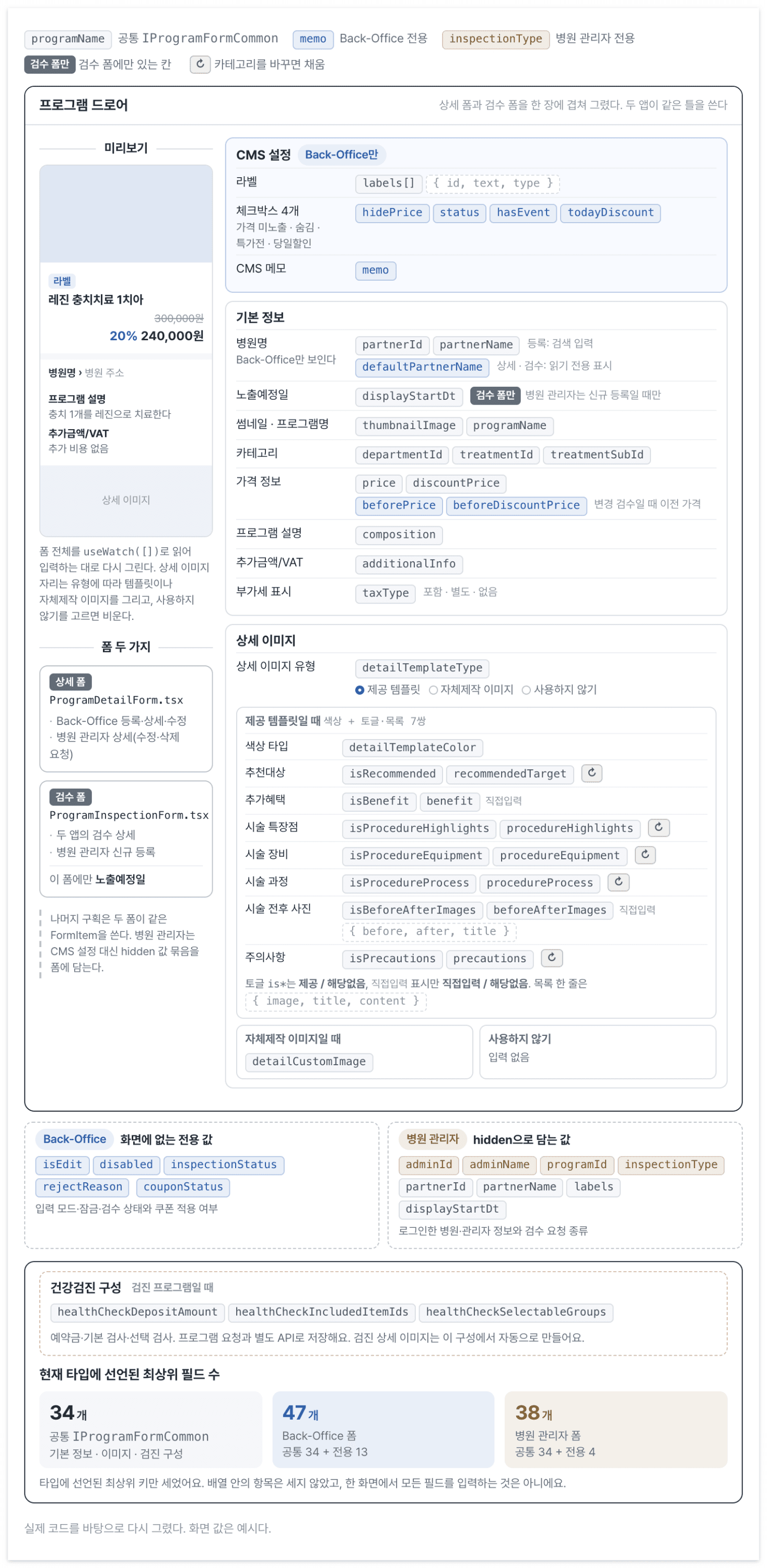
The two apps need slightly different values for the same program. Input values in this diagram are examples.
I shared the inputs and value types that should change together and left review and submission in each app. Mapping API responses into form values, turning edits into requests, and loading a category’s default template also became separate from the inputs.
The examples include only the relevant code. Internal identifiers for hospitals have been renamed to partner.
From shared field names to typed values
I first gathered field names in an enum. That helped with typos but did not stop a string being assigned to price. A getFieldValue call could name the right field while its caller misunderstood the returned value.
The shared program form and each app's form now use createTypedForm<T>(). This wrapper accepts a value type once and applies it to Item, List, useForm, useFormInstance, and useWatch.
// 공유 패키지
export const ProgramForm = createTypedForm<IProgramFormCommon>();

// Back-Office 앱: 공통 값에 운영·검수 전용 값을 더해요.
export interface IProgramInspectionClient extends IProgramFormCommon {
  memo?: string;
  hidePrice?: boolean | null;
  rejectReason?: string;
  // 나머지 앱 전용 필드 생략
}

export const ProgramInspectionForm =
  createTypedForm<IProgramInspectionClient>();
Shared inputs use ProgramForm to read common fields; Back-Office inputs use ProgramInspectionForm to reach its additional fields. Both APIs use the same Ant Design Form context. They split the permitted types without duplicating the values or instance.
const form = ProgramForm.useFormInstance();

const name = form.getFieldValue('programName'); // string
const price = form.getFieldValue('price');     // number

form.setFieldValue('price', 100000);
form.setFieldsValue({ programName: '프로그램명', price: 100000 });

// 아래 두 호출은 타입 검사에서 걸려요.
form.getFieldValue('programNmae');
form.setFieldValue('price', '100000');
I wanted getFieldValue('price') to return a number and setFieldValue('price', ...) to accept the same type. TFieldNamePath<T> limits names and nested paths, while TPathValue<T, P> finds the type at the chosen path.
// TFieldNamePath<T>와 TDeepPartial<T>의 구현은 생략했어요.
type TPathValue<T, P> =
  P extends keyof T
    ? T[P]
    : P extends readonly [infer K, ...infer Rest]
      ? K extends keyof T
        ? Rest extends []
          ? T[K]
          : TPathValue<T[K], Rest>
        : never
      : never;

// 인스턴스에서 제공하는 메서드의 타입
interface ITypedFieldAccess<T> {
  getFieldValue: <P extends TFieldNamePath<T>>(
    name: P,) => TPathValue<T, P>;

  setFieldValue: <P extends TFieldNamePath<T>>(
    name: P,
    value: TPathValue<T, P> | undefined,) => void;
}
infer splits the first path element from the rest and follows the path to find its type. setFieldsValue accepts TDeepPartial<T> for partial nested updates. useWatch includes undefined because a field may not have been registered yet.
Assertions needed to connect Ant Design remain inside the wrapper. Callers use an API linking field names to value types instead of asserting return values again.
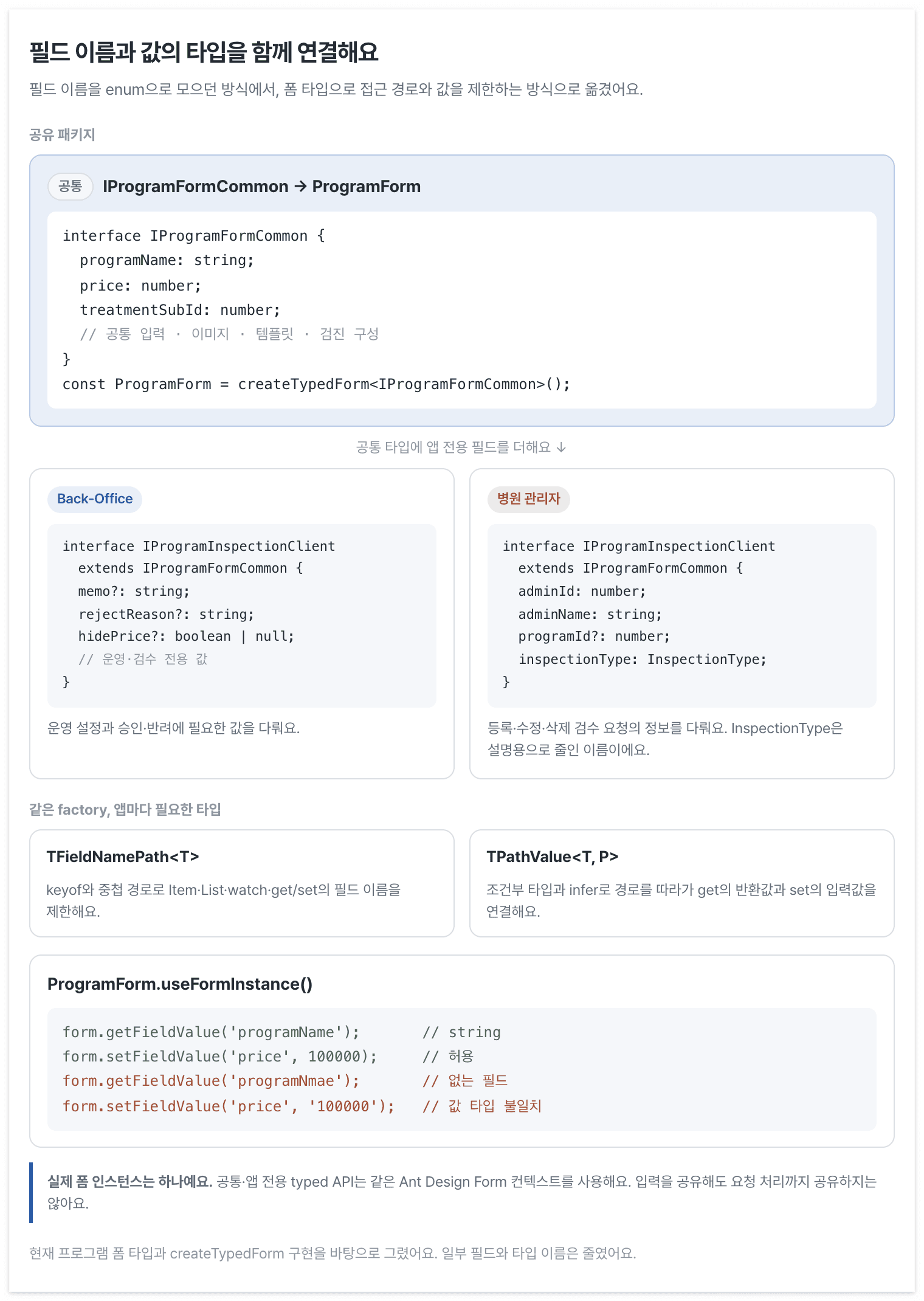
Shared and app-specific types also govern the methods that read and write their fields.
Share inputs and leave assembly with the caller
The template editor and program form share inputs for recommended patients, treatment highlights, equipment, procedure, and precautions.
Treatment highlights exposed a difference. The template editor registers an icon and text, but the program keeps the imported icon and changes only the text. Instead of adding another option to the shared component, I separated FormList from the inputs placed inside it.
// 하위 시술 템플릿 편집: 아이콘과 문구를 함께 입력해요.
<ProcedureHighlight.FormList>
  {({ field, index }) => (
    <>
      <ProcedureHighlight.Image field={field} />
      <ProcedureHighlight.Input field={field} index={index} />
    </>
  )}
</ProcedureHighlight.FormList>

// 프로그램 폼: 문구만 수정해요.
<ProcedureHighlight.FormList>
  {({ field, index }) => (
    <ProcedureHighlight.Input field={field} index={index} />
  )}
</ProcedureHighlight.FormList>
FormList owns the toggle and list. The caller chooses each row's inputs. Recommended patients and procedures share the same implementation. Equipment and precautions provide default assembly while also exposing the pieces needed by callers.
Some template inputs still use the original Ant Design Form. Compound composition does not itself make an input typed. The typed API limits fields the code can read and write; composition decides whether a screen shows the icon, text, or both.
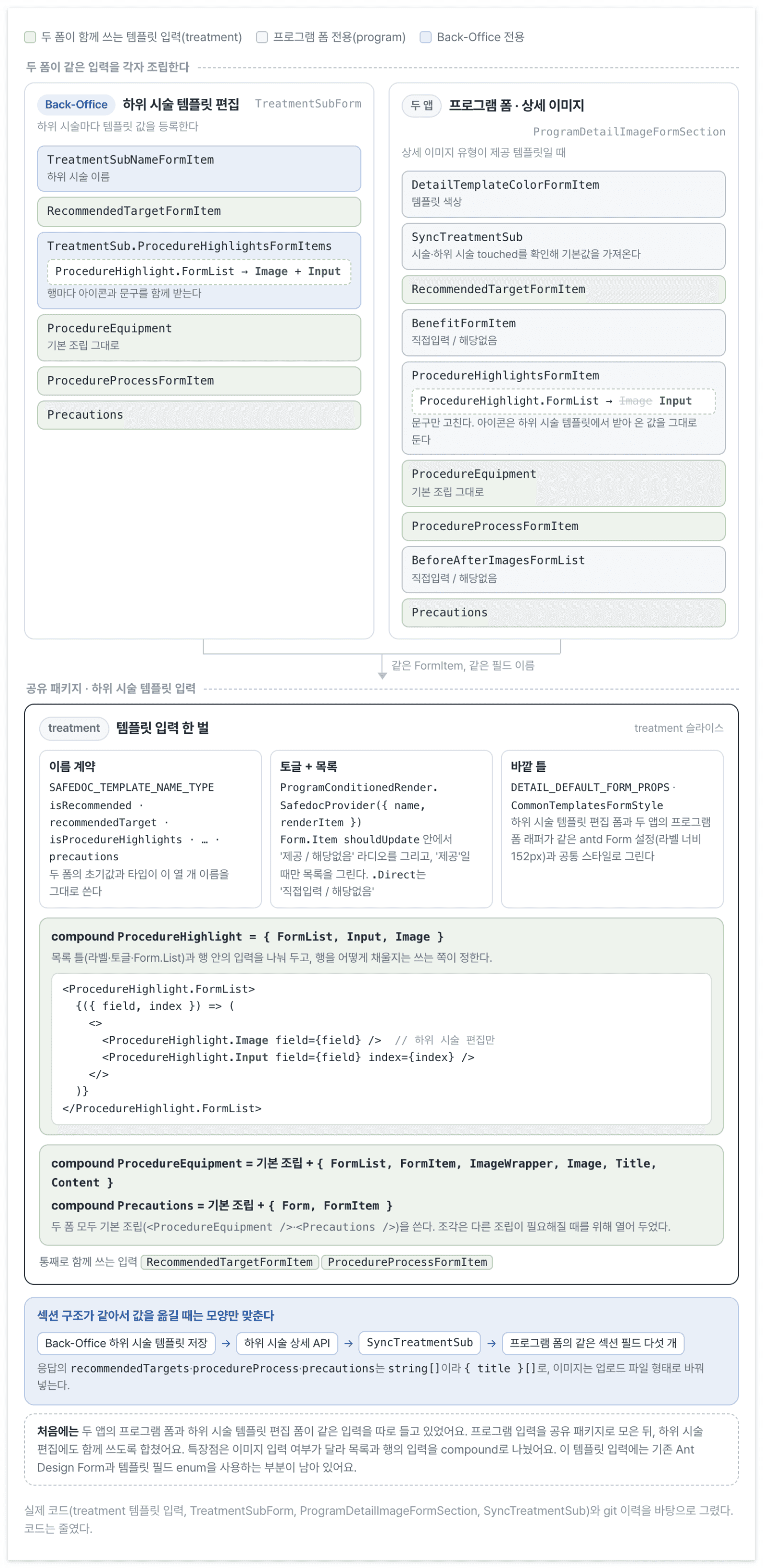
Only inputs with different behavior are assembled differently; the others share one implementation.
Common inputs know nothing about review-request or approval APIs. The app owns onFinish and request buttons. Hospital requests and Back-Office approvals do not live in the same component.
Keep the server's representation out of inputs
The server groups template items by type and adds orderNo, which was awkward to use directly in the editor. The screen needs to add and remove rows and edit images as the upload component’s file list.
I therefore separated response-to-form and form-to-request functions. Input components handle only the shape needed for editing.
API 응답 → 응답 변환 함수 → 폼 값 → 요청 변환 함수 → API 요청
                            ↑
                   FormItem은 이 모양만 다뤄요.
The input components no longer need to interpret response and request formats individually. Values stay in the form’s editing shape and are converted where they meet the API.
The same input handles saved images and newly uploaded ones. Converting a saved asset to UploadFile with the asset in response puts it in the same place as a new upload’s result. Submission no longer needs separate branches for old and new files.
Thumbnails and custom images currently use UploadFile<TCommonAsset>. The upload response generic preserves the asset type through reads of response.id.
type TProgramClientImage = UploadFile<TCommonAsset>;

// 저장된 이미지도 업로드 컴포넌트가 사용하는 형태로 바꿔요.
function convertCommonAssetToUploadFile<T extends TImageFileInfo>(
  asset: T,
): UploadFile & { response: T } {
  return {
    uid: String(asset.id),
    name: asset.originalFileName || asset.fileName,
    status: 'done',
    url: asset.src,
    response: asset,
  };
}
Request construction explicitly selects fields rather than spreading the entire form. Thumbnails become image IDs and dates become strings. Screen-only previous prices and input modes stay out. Health-check configuration added later is edited in this form but saved by a separate API, so it is excluded from the program request too.
Template conversions follow several rules.
- Sort response items by
orderNo; edit them in array order. - For title-only sections, remove empty rows and renumber on submission. Do not apply that filter to image sections.
- Pair before-and-after photos by
orderNo, not array index, to make one form row. Split them into two equally numbered arrays for the request. - Distinguish
nullorundefinedfrom an empty array. An absent section disables its toggle; an empty array keeps the toggle on and displays an initial row. - Draft and final requests treat empty sections differently. Drafts may retain empty arrays; review and registration requests omit empty sections.
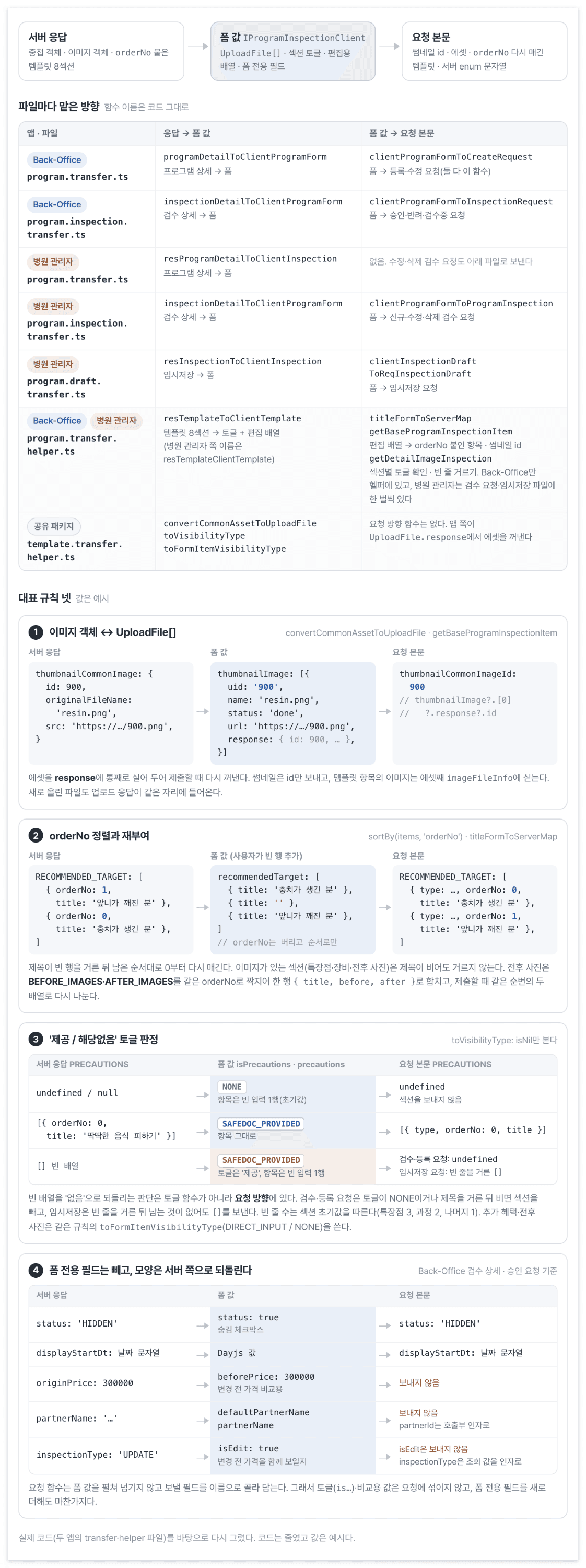
The shared editing shape is separated from the shape required by each request.
Separate initial loading from category changes
The editor also needs to distinguish when values are filled. Opening a detail loads the saved program; changing its category loads a sub-treatment’s default template. Mixing those paths can let a query response overwrite the person’s edits.
The review-detail container mounts the form after required queries finish and initial values can be built. Moving to another record in the same drawer calls resetFields() when initial values change. Passing a later asynchronous response to initialValues does not reinitialize an existing instance.
SyncTreatmentSub loads the sub-treatment template. It reads treatment and sub-treatment IDs from the form, using skipToken in query options so the query runs only when both exist.
The effect checks the response and whether the fields are touched. Looking only at the treatment ID misses a switch between sub-items of the same treatment, so it checks the sub-treatment ID too.
const form = ProgramForm.useFormInstance();

const treatmentId =
  ProgramForm.useWatch(['treatmentId'], form) ||
  form.getFieldValue(['treatmentId']);
const treatmentSubId =
  ProgramForm.useWatch(['treatmentSubId'], form) ||
  form.getFieldValue(['treatmentSubId']);

const { data } = useQuery(
  treatmentSubDetailQueryOptions({ treatmentId, treatmentSubId }),
);

const isTouchedTreatmentId = form.isFieldsTouched(['treatmentId']);
const isTouchedTreatmentSubId = form.isFieldsTouched(['treatmentSubId']);

useEffect(() => {
  if (!data || !(isTouchedTreatmentId || isTouchedTreatmentSubId)) return;

  // 실제 구현은 추천 대상·특장점·장비·과정·주의사항을 갱신해요.
  const { recommendedTargets } = data.data;
  form.setFieldValue(
    'recommendedTarget',
    isEmpty(recommendedTargets)
      ? INITIAL_RECOMMENDED_TARGET
      : recommendedTargets?.map((title) => ({ title })),
  );
}, [data, form, isTouchedTreatmentId, isTouchedTreatmentSubId]);
Synchronization is limited to five template sections. It leaves manually entered extra benefits and before-and-after photos alone. This component also converts the query response to form values, avoiding repeated fetching and updates in each input component.
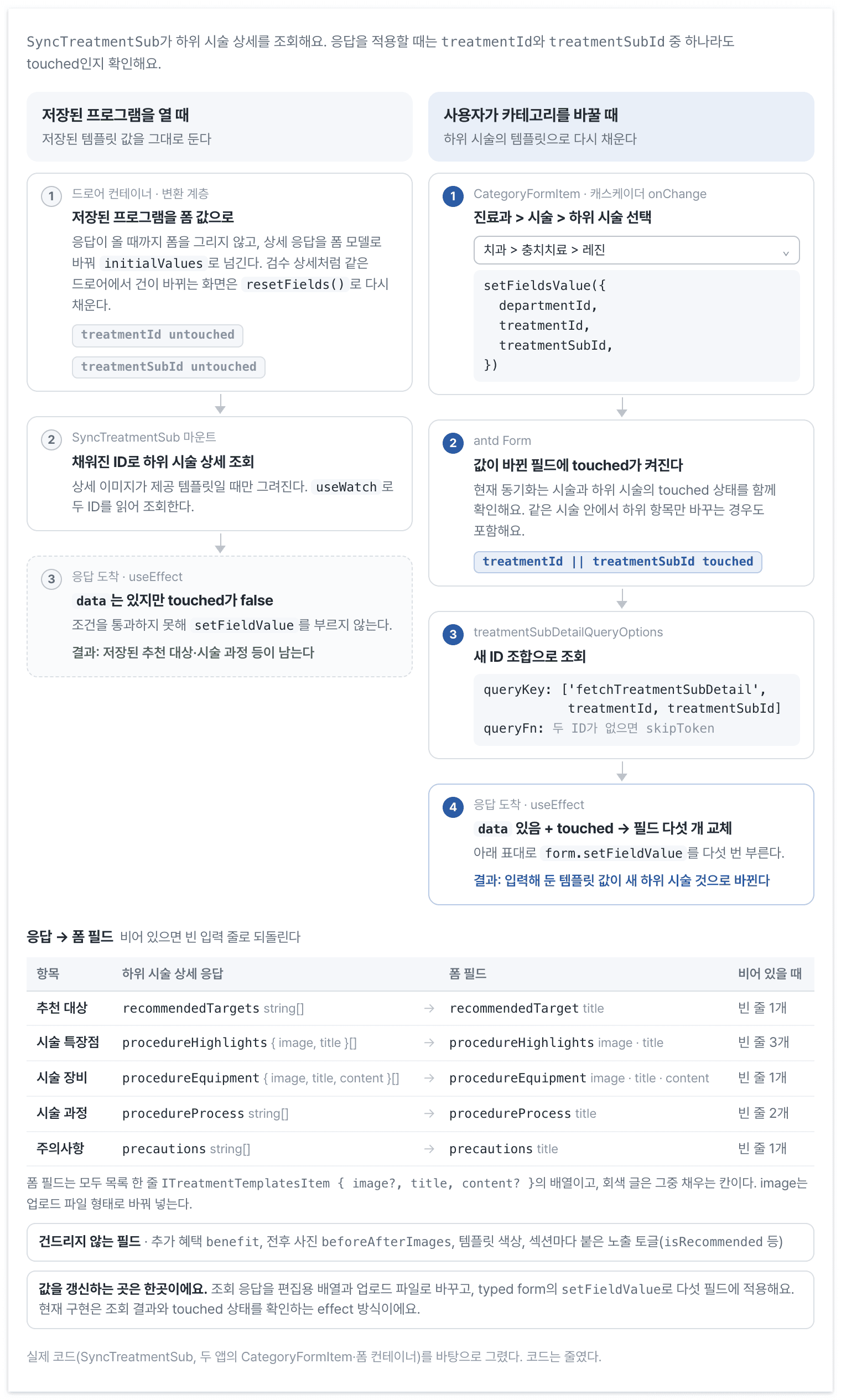
Query conditions, application conditions, and updated fields can be inspected in one place.
Preserve conversion rules in tests
I initially wrote the conversions without tests. Correct field types could still produce the wrong request, so I added cases for both apps’ response conversions, program and review requests, and drafts.
These go beyond checking that a converted value exists. They verify that unordered before-and-after images pair by sequence, a separate ID is used when an image object lacks one, and a deleted thumbnail is submitted as null.
This is a shortened version of an actual conversion test. createClientForm fills the remaining defaults.
it('빈 제목을 거른 뒤 남은 순서대로 순번을 매긴다', () => {
  const form = createClientForm({
    isRecommended: SAFEDOC_PROVIDED_TYPE.SafedocProvided,
    recommendedTarget: [
      { title: '' },
      { title: '30대' },
      { title: '40대' },
    ],
  });

  const result = getDetailImageInspection(form);
  const templates = result[PROGRAM_DETAIL_TEMPLATE_TYPE.SafedocTemplate].templates;

  expect(templates.RECOMMENDED_TARGET).toEqual([
    { type: 'RECOMMENDED_TARGET', orderNo: 0, title: '30대' },
    { type: 'RECOMMENDED_TARGET', orderNo: 1, title: '40대' },
  ]);
});
Image-bearing highlights must not be removed merely because their title is empty. That difference is tested too. Draft tests separately verify that an array emptied by filtering blank titles is still sent.
Type checking validates names and values accessed through the typed API. Conversion tests validate the request shape. A correct type and a correct payload are different checks.
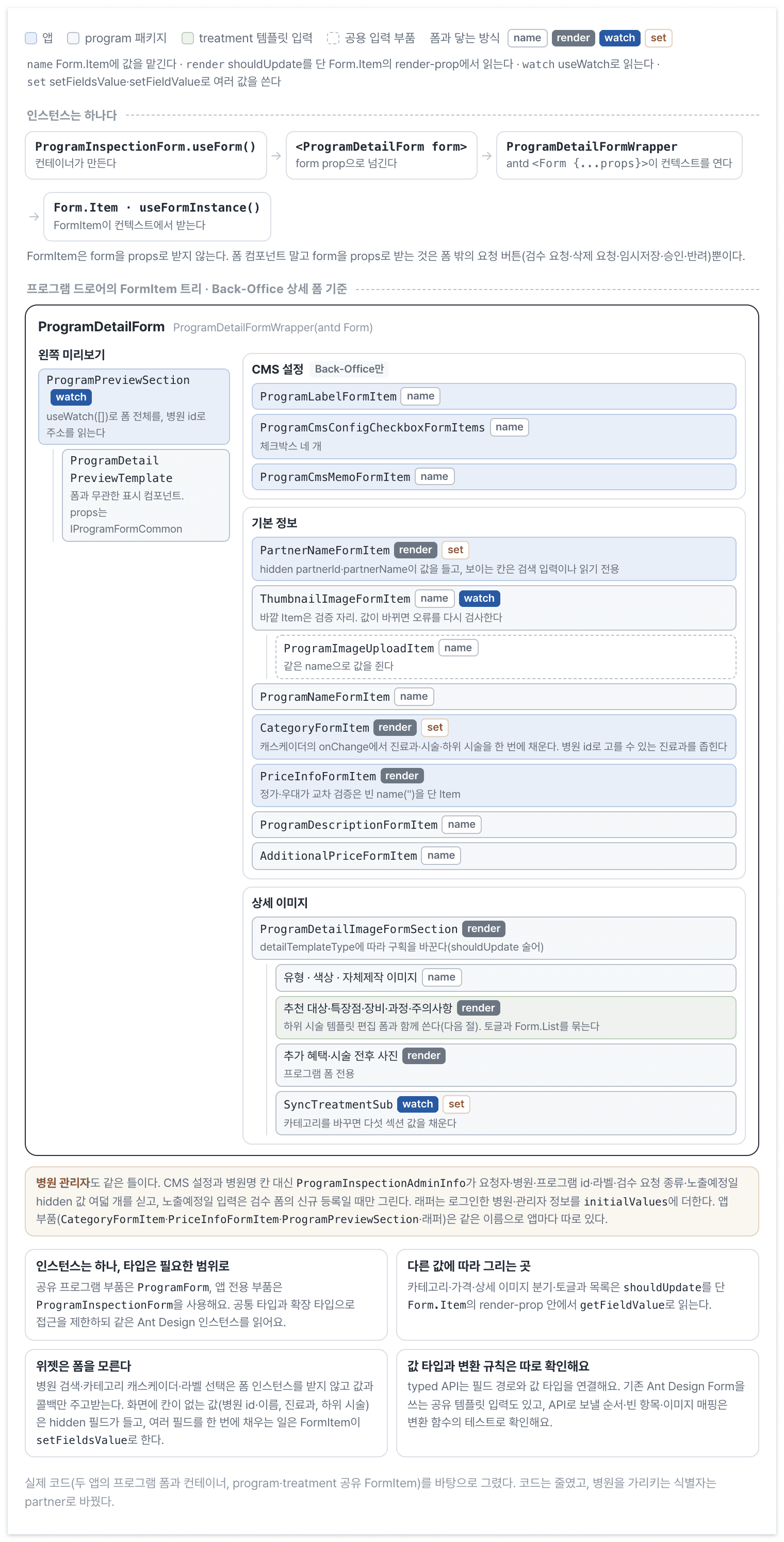
Inputs share one instance. Field access and submitted data are checked in different places.
A program-field change takes me to the shared type and FormItem; an API-format change takes me to conversions and their tests. Review requests and approvals no longer need to follow shared inputs into another screen.
The typed form checks field paths and value types passed in code. It cannot verify the actual server response or prevent an asynchronous query from overwriting an edit. Conversion tests and checks of loading, editing, and submitting in the UI still have separate jobs.