
An illustration of the topic, rather than an actual product screenshot or exact architecture diagram.
Changing a review field meant following its storage action, error message, and next-step condition. Users upload visit proof, enter treatment and payment details, then add ratings, photos, and text. Each input nevertheless knew how to update global stores and run validation beyond its own field.
I moved values to React Hook Form, validation to Zod, and retained a funnel hook for navigation. Treatment selection also moved from a dropdown to a Bottom Sheet. Its update timing could not stay the same: closing without confirmation could cancel only if ongoing choices were separate from the form.
Draft values and the current step were global
A draft store and a step store drove the screen, with step selecting the current view.
type DraftStore = {
  draft: ReviewDraft;
  setField: <K extends keyof ReviewDraft>(
    key: K,
    value: ReviewDraft[K],) => void;
};

type StepStore = {
  step: number;
  moveForward: () => void;
  moveBack: () => void;
};switch (step) {
case 1:
return <ProofStep />;
case 2:
return <DetailsStep />;
default:
return <FeedbackStep />;
}A separate API already handled saving drafts. Other screens did not need the ongoing values or current step, and page-local form instances could retain values between stages.
Validate the fields visible in each step
I first tried combining everything into one form. Different fields mounted and validation ran at different times in each stage. RHF therefore manages values and fields, Zod validates them, and a shared wrapper around @use-funnel/core changes the current step.
A parent form retains the complete draft while each step has its own form. Passing a step merges those values into the parent before continuing.
Step refinements did not reach the overall schema
The schemas separate fields by step. This example uses renamed fields and keeps the main definitions and additional validation.
import { z } from 'zod';

export const ProofStepSchema = z.object({
  proofFiles: z.array(UploadSchema).min(1).max(5),
});

export const DetailsStepSchema = z
  .object({
    visibilityFlag: z.boolean(),
    items: z.array(ItemSchema).min(1).max(5),
    quoteFieldEnabled: z.boolean().optional(),
    quotedAmount: z.number().optional(),
    paidAmount: z.number().min(1),
    amountFlag: z.boolean().optional(),
    receivedBenefitInfo: z.boolean(),
    missingBenefitReason: z
      .object({
        value: z.enum(MISSING_INFO_REASONS),
        description: z.string(),
      })
      .optional()
      .nullable(),
  })
  .superRefine((data, ctx) => {
    if (data.quoteFieldEnabled && (!data.quotedAmount || data.quotedAmount <= 0)) {
      ctx.addIssue({
        code: z.ZodIssueCode.custom,
        path: ['quotedAmount'],
        message: '금액을 입력해 주세요.',
      });
    }

    if (!data.receivedBenefitInfo && !data.missingBenefitReason) {
      ctx.addIssue({
        code: z.ZodIssueCode.custom,
        path: ['missingBenefitReason'],
        message: '안내받지 못한 이유를 입력해 주세요.',
      });
    }
  });

export const FeedbackStepSchema = z.object({
  attachments: z.array(UploadSchema),
  ratings: z.array(
    z.object({
      criterion: z.enum(RATING_CRITERIA),
      score: z.number().min(0).max(2),
    }),
  ),
  body: z.string().min(50).max(500),
  wouldRecommend: z.boolean(),
});

export const SubmissionSchema = z
  .object({
    // 방문 인증 단계에서는 min(1)을 쓰지만 전체 스키마에서는 필수가 아니다.
    proofFiles: z.array(UploadSchema).max(5),
  })
  .extend(DetailsStepSchema._def.schema.shape)
  .extend(FeedbackStepSchema.shape);
Step two conditionally requires a quoted amount or a reason benefit information was not received. DetailsStepSchema checks those in superRefine. That refinement wraps the object in ZodEffects, without direct access to .shape.
SubmissionSchema reaches the inner object's fields through the internal _def.schema property. Copying fields does not copy superRefine. Conditional validation runs in the step but is absent from the overall schema, which also remains coupled to Zod internals.
The different minimum for proofFiles is intentional. The proof step requires at least one file, but some routes skip that step. The overall schema therefore omits min(1) for it.
Connect amount inputs through values and changes
function AmountField() {
  const { control } = useFormContext<DetailsStepValues>();

  return (
    <Controller
      control={control}
      name="paidAmount"
      render={({ field: { value, onChange } }) => (
        <NumericInput
          value={value}
          onChange={normalizeNumericInput(onChange)}
        />
      )}
    />
  );
}
Controller connects NumericInput's value and onChange to RHF. The step schema checks amount conditions, so the input no longer calls Zustand actions or a separate validation function.
Choosing several treatments was awkward on mobile
Items holds one to five unique treatments. Its array shape and rules stayed the same while selection UI changed.
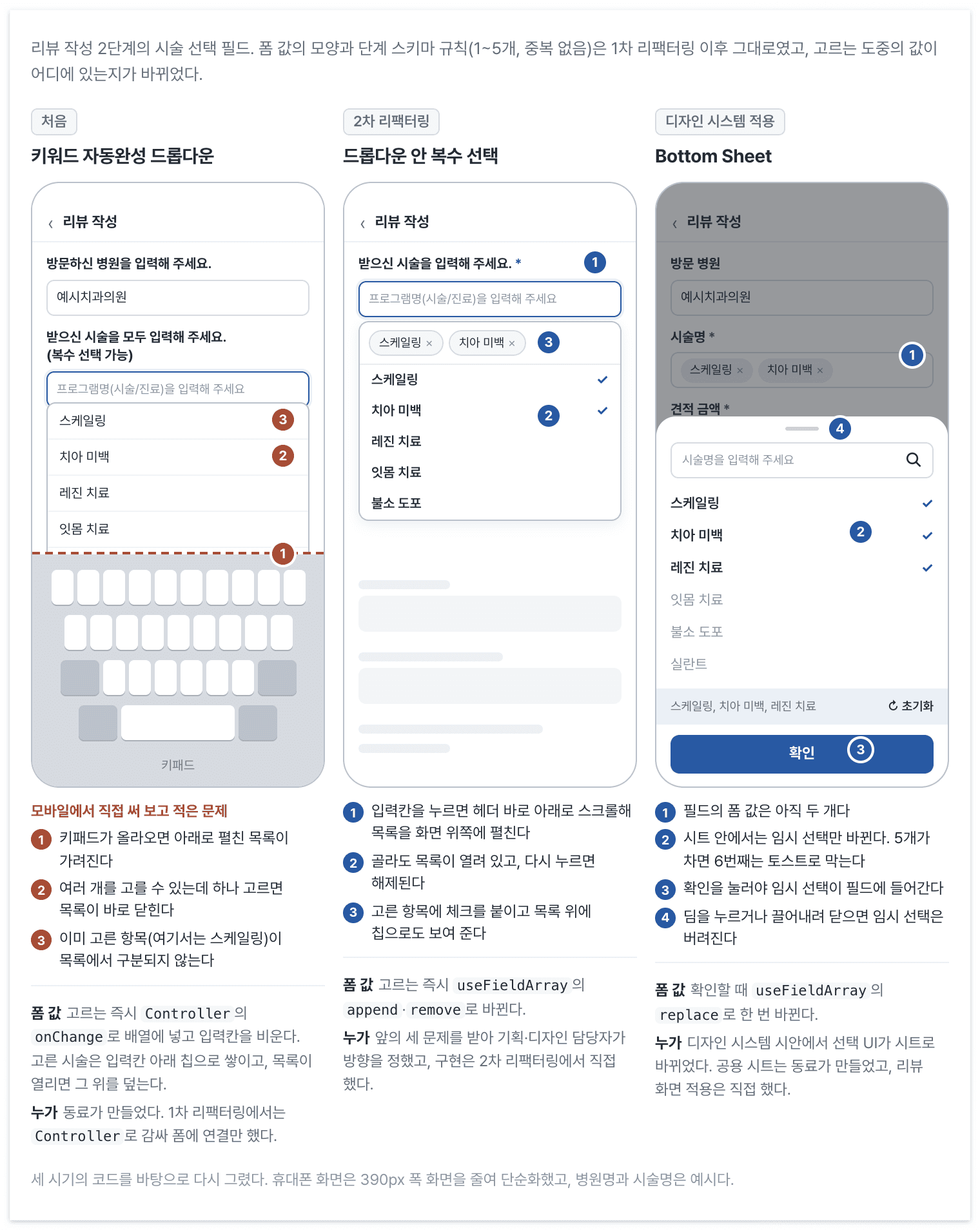
Treatment selection changed twice: multiple selection inside the dropdown came in the second refactoring, and Bottom Sheet came with the design system. Form updates moved from each selection to confirmation.
The original UI was a colleague's autocomplete dropdown. Tapping the input opened a list below it; choosing a treatment closed the list and cleared the search. Selections accumulated as chips below. The initial form migration only wrapped that UI in Controller.
Trying it on mobile meant reopening and searching for every treatment. The keyboard obscured the list, and selected items were not marked. I recorded those problems in Jira and shared them with the PO. Planning and design included them in the next refactoring.
We retained a dropdown but supported multiple choices within it, marked selections with checks and chips, and scrolled the input just below the header. I built that with Radix Popover and cmdk and released it. Each selection still immediately changed the form through useFieldArray.append or remove.
Later design-system mockups replaced the selection UI with a Bottom Sheet. That was separate from the dropdown improvement. A colleague built the shared sheet; I connected it to review writing.
Immediate form edits prevented cancellation
I first connected the sheet like the dropdown, updating the form immediately. Closing without confirmation then retained the changes. I tried restoring old values after close, before changing direction the next day: keep temporary choices in the sheet and return them only on confirmation. Both approaches preceded release.
ItemsField and ItemPickerSheet are publication aliases. Their opening and confirmation connection looks like this.
// FieldBox는 입력칸 모양의 상자(가명)다. 필드 이름도 가명이다.
// openBottomSheet·closeBottomSheet는 공용 시트의 전역 스토어를 여닫는 함수다.
function ItemsField() {
  const { control } = useFormContext<DetailsStepValues>();
  const { fields: items, replace, remove } = useFieldArray({ control, name: 'items' });

  const openPicker = () =>
    openBottomSheet({
      detent: 'content-height',
      fullContents: true,
      children: <ItemPickerSheet initialItems={items} onConfirm={replace} />,
    });

  return (
    <FieldBox onClick={openPicker}>
      {items.map(({ itemId, itemName }, index) => (
        <Tag key={itemId} text={itemName} onClose={() => remove(index)} />
      ))}
    </FieldBox>
  );
}

function ItemPickerSheet({ initialItems, onConfirm }: ItemPickerSheetProps) {
  const [draft, setDraft] = useState(initialItems);

  const toggle = (item: DetailsStepValues['items'][number]) => {
    if (draft.some(({ itemId }) => itemId === item.itemId)) {
      setDraft((prev) => prev.filter(({ itemId }) => itemId !== item.itemId));
      return;
    }
    if (draft.length >= 5) {
      toast.warning('시술은 최대 5개까지 선택 가능해요.');
      return;
    }
    setDraft((prev) => [...prev, item]);
  };

  return (
    <div>
      {/* 검색 입력, 체크 목록(행을 누르면 toggle), 고른 항목 요약과 초기화(setDraft([])) */}
      <Button
        onClick={() => {
          onConfirm(draft);
          closeBottomSheet();
        }}
      >
        확인
      </Button>
    </div>
  );
}
openBottomSheet stores the supplied element globally, and an app-root Provider renders it. The sheet is not a FormProvider child, so it cannot use useFormContext. The field passes items and replace from useFieldArray as props instead.
The sheet creates draft from its opening-time items. Rows update draft, while confirmation alone calls replace on the form array. Tapping the backdrop or dragging down returns no values. After the exit animation, content unmounts and discards draft; reopening starts from the current form values.
The chip's × stops propagation and calls remove without opening the sheet. Removing directly in the field and cancelling choices inside the sheet are separate actions.
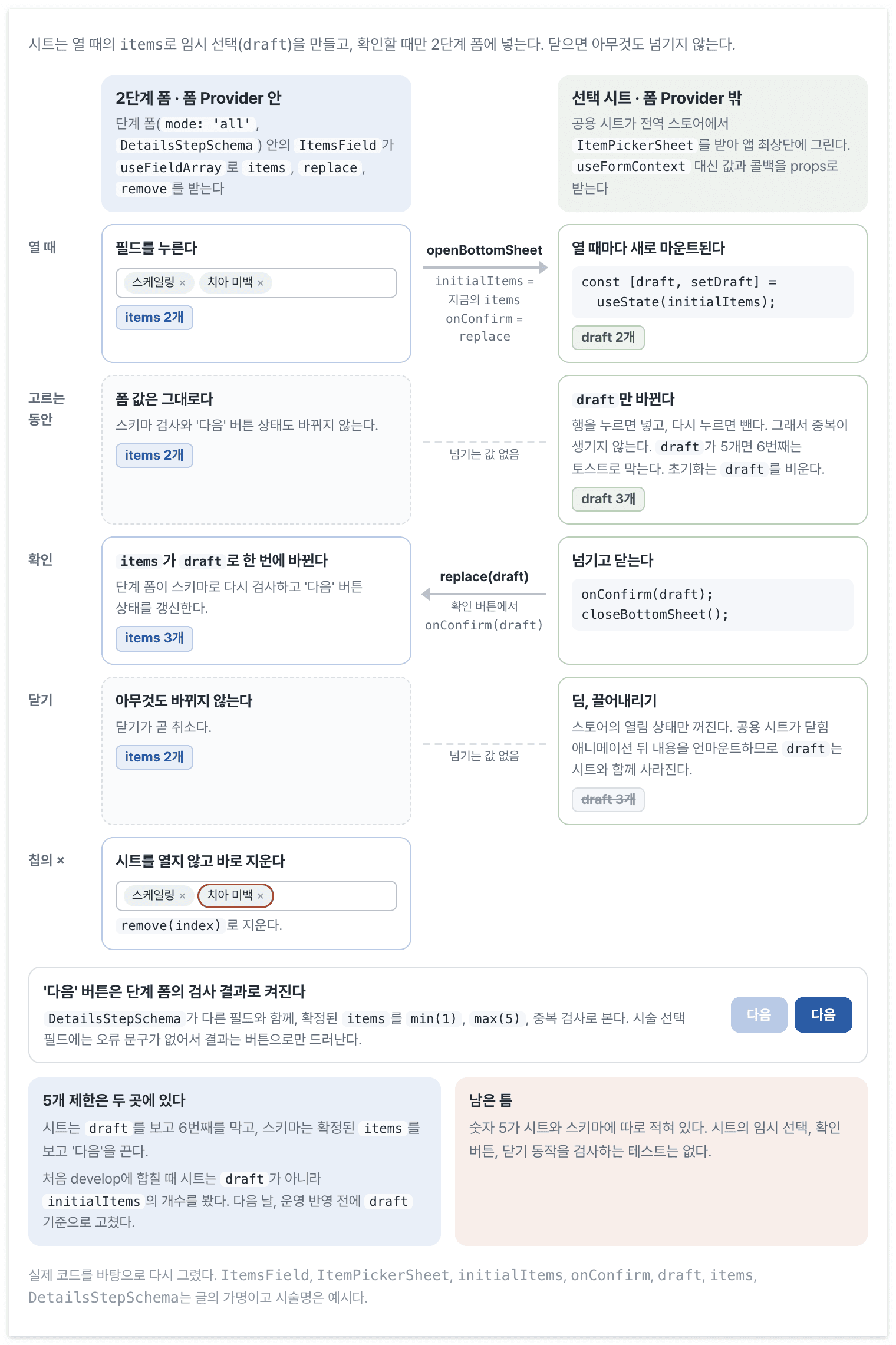
The sheet starts with the opening values and passes its temporary selection to the field through replace only on confirmation. Closing passes nothing back.
Count current draft choices rather than opening values
The sheet blocks another selection with a toast when draft has five items. Selecting an existing treatment removes it, preventing duplicates. The schema checks confirmed items using min(1), max(5), and a duplicate check omitted from the earlier example. This field has no separate error message, so a failure only disables Next.
When first merged into develop, the sheet checked initialItems.length rather than draft. Opening with fewer than five items could then allow unlimited choices and disable Next only after confirmation. I changed it to draft the following day, before production. It needed to count ongoing choices, not the number previously committed to the form.
Step forms work similarly: they validate changes for that stage before merging them into the full draft.
Merge validated values before moving forward
// useSchemaForm·useStepFunnel·StepForm은 공용 폼 훅, 퍼널 훅, 단계 폼 래퍼의 공개용 가명이다.
// needsProof는 방문 인증 단계부터 시작하는 경우, isVisited는 예약이 방문 완료 상태인 경우다.
const form = useSchemaForm({
  schema: SubmissionSchema,
  defaultValues: savedDraft
    ? mapResponseToDraft(savedDraft.data)
    : emptyDraft,
});

const flow = useStepFunnel<Record<'proof' | 'details' | 'feedback', object>>({
  initial: {
    step: needsProof ? 'proof' : 'details',
    context: {},
  },
  id: 'public-example-flow',
});

const mergeAndReset = useCallback(
  (callback: (data: ReviewDraft) => void) =>
    <T extends Partial<ReviewDraft>>(stepValues?: T) => {
      const mergedDraft = {
        ...form.formState.defaultValues,
        ...stepValues,
      } as ReviewDraft;

      form.reset(mergedDraft);
      callback(mergedDraft);
    },
  [form],
);

const moveToStep = useCallback(
  (step: typeof flow.step) =>
    mergeAndReset(() => flow.history.replace(step)),
  [mergeAndReset, flow],
);

const confirmSubmission = mergeAndReset((data) =>
  openConfirmDialog({
    primaryAction: {
      text: '제출',
      onConfirm: () => submitDraft(data),
    },
  }),
);

return (
  <flow.Render
    proof={() => (
      <StepForm
        schema={ProofStepSchema}
        defaultValues={form.formState.defaultValues}
        onComplete={moveToStep('details')}
      >
        <ProofStep />
      </StepForm>
    )}
    details={() => (
      <StepForm
        schema={DetailsStepSchema}
        defaultValues={form.formState.defaultValues}
        onBack={needsProof ? moveToStep('proof') : undefined}
        onComplete={moveToStep('feedback')}
      >
        <DetailsStep />
      </StepForm>
    )}
    feedback={() => (
      <StepForm
        schema={FeedbackStepSchema}
        defaultValues={form.formState.defaultValues}
        onBack={moveToStep('details')}
        onComplete={confirmSubmission}
      >
        <FeedbackStep isVisited={isVisited} />
      </StepForm>
    )}
  />
);
StepForm creates a mode: 'all' form for each stage. Values passing its schema merge with the parent RHF defaultValues, then reset supplies initial values for the next stage. The funnel's history.replace changes the visible step. Values do not enter funnel context, and history.push does not accumulate step snapshots.
The last stage merges values before confirmation and the API call too, but does not run SubmissionSchema.parse again. It assumes previously validated values remain valid. Final submission therefore lacks a fresh check of every step's conditions.
Prepare edit data before building defaults
An existing savedDraft is converted into defaultValues. RHF caches those when creating the form; starting with an empty form does not populate it merely because the response arrives later.
The server page prefetches reservation and review data and transfers the cache through HydrationBoundary. The client reads it through useQueries with the same options.
// 컴포넌트, 쿼리 옵션, 경로 파라미터 이름은 공개용 가명이다.
// 서버 페이지. 예약 id와 리뷰 id가 모두 있는 경로이고, 다른 경로는 있는 id만 미리 요청한다.
async function ReviewEditorRoute({ params }: EditorRouteProps) {
  const { sourceId, draftId } = await params;
  const queryClient = getQueryClient();

  await Promise.all([
    queryClient.prefetchQuery(sourceByIdQuery(Number(sourceId))),
    queryClient.prefetchQuery(draftByIdQuery(Number(draftId))),
  ]);

  return (
    <HydrationBoundary state={dehydrate(queryClient)}>
      <ReviewEditorPage />
    </HydrationBoundary>
  );
}

// 클라이언트 템플릿
function ReviewEditorPage() {
  const { sourceId, draftId } = useParams<EditorRouteParams>();
  const [{ data: sourceInfo }, { data: savedDraft }] = useQueries({
    queries: [
      sourceByIdQuery(toOptionalNumber(sourceId)),
      draftByIdQuery(toOptionalNumber(draftId)),
    ],
  });

  const form = useSchemaForm({
    schema: SubmissionSchema,
    defaultValues: savedDraft
      ? mapResponseToDraft(savedDraft.data)
      : emptyDraft,
  });

  // 퍼널과 단계 폼은 앞 절의 코드와 같다.
}
Because the server waits for the requests before rendering, edit data is already cached on the client's first render. The converted values become its initial defaultValues. This screen does not wait for the response through client Suspense.
Navigation does not explain every form value
Each stage now has its own fields and validation, but merging defaultValues and resetting between stages remains necessary. Funnel context is empty and replace only changes the screen, so the library's role deserves another look. Values containing browser objects such as photos are also difficult to restore through URL serialization alone.
The input types retain ambiguity too. Visibility is a boolean converted to the API's hidden/public enum. Omitting other request transformations, that conversion is:
function toSubmissionRequest(form: ReviewDraft): SubmissionRequest {
  const { visibilityFlag, ...rest } = form;

  return {
    ...rest,
    visibilityFlag: visibilityFlag
      ? VISIBILITY.Hidden
      : VISIBILITY.Public,
  };
}
Understanding whether true means public or hidden requires reading this conversion. PUBLIC or HIDDEN within the form would expose its meaning directly, but the current form retains the boolean. Moving state out of a store did not resolve that interpretation.